 | Start a lead gen campaign on LaunchBit and cost-effectively grow your company today! From our sponsors  |
| APKTOP |
| Free Android Apps,Games Download From Android Market |
KK Launcher (KitKat Launcher) 3.6
5/11/2014 1:28:43 PM
Current Version: 3.6
Requires Android: 4.0 and up
Category: Personalization
v3.6 update:
v3.95 update(2014-5-8):
1. KK Locker was released
2. Optimize icon pack support: icon mask, icon back, icon upon and alternate icons
3. Optimize destop infinite scrolling
4. Optimize folder preview
5. Fix several FC bugs
6. Support set icon pack from icon pack's itself dashborad
(Note: for icon pack creators, please refer to above KK description, email us if you need support)
We dev ACTIVELY, please email us if error, please rate high and spread KK if you like, thanks
Overview:
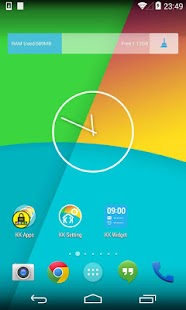
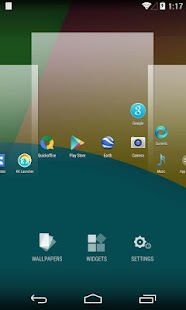
KK Launcher, is the most polished, highly customizable KitKat style launcher, Smooth, Rich features, NO AD, Your best choice!
“The closest you get to stock Android KitKat. It's amazing how many options this launcher gives” –Kostas
“Really good, seriously the best KitKat launcher on the market ! ” –Steven
Q: What is the difference between KK Launcher and Nova Launcher, Apex Launcher ?
A: KK Launcher base on AOSP Android 4.4, while Nova and Apex base on Android 4.0, so the KK's UI and UE is pure KitKat experience and inherit the HUGE improvement from Android 4.4
Q: What is the difference between KK Launcher and Google Now Launcher ?
A: KK Launcher has MANY enancement features and MANY customizable options, supporting Android 4.0+
Features:
1. Based on Android 4.4 launcher, support for Android 4.0+ (ICS, JB, KitKat)
2. Support icon theme, compatible with theme and icon pack that users made for nova launcher, adw launcher, go launcher, apex launcher, etc
3. Translucent status bar and navigation bar (Android4.4 devices, and Galaxy S4, Galaxy Note2/3, Tab2/3 ,etc )
4. Transparent status bar clone for Android 4.0-4.3
5. Drawer features: Hide app, Create folders, Sort app, Quick A-Z bar
6. Drawer style: Horizontal, Vertical, Vertical with category
7. Many Desktop and Drawer transition effect
8. Many gestures and Dock icon gesture
9. Unread Counts/Notifier
10. Support edit icon
11. UI Size Mode: Small, Medium, Large, Extra large
12. Parallax effect
13. 1*1 widgets on dock
14. Allow swipe right to Google Now
15. Nexus 5 HD wallpapers
16. Resize any widget
17. Backup and restore launcher setting and layout
18. Import layout from other launcher
19. Highly customizable, MANY options:
【Launcher Desktop :】
+ Set launcher desktop grid
+ Set icon size, icon text size/color, hide icon text
+ Lock desktop option
+ Hide search bar, status bar
+ Hide shadow, indicator
+ Infinite scrolling
+ Set launcher default Home Screen to Left, Middle or Right
+ Wallpaper scrolling
+ Theme support: such as Galaxy, iOS 7, Win 8 icon pack
【Launcher Dock :】
+ Multi Dock pages
+ Number of Dock icons
+ Dock icon size
+ Hide Dock
+ Drawer icon position
【Launcher Drawer :】
+ Set launcher drawer grid
+ Drawer folder
+ Set icon size, icon text size/color
+ Background transparent
【Launcher Sidebar:】
+ Quick toggle
+ Favorite apps, Recent apps
+ KK Clearner
【Launcher Folder :】
+ Max rows and columns
+ Folder background
+ Folder preview style
+ Bulk add for folder
KitKat launcher, AOSP launcher, Android4.4 kit kat theme, KitKat home,
Android 4.4 nexus 5 launcher, GEL launcher, Google Experience Launcher
Permissions explaination:
- Directly Call Phone Numbers: only used if you place a direct-dial shortcut on the homescreen
- READ_SMS, READ_CONTACTS, READ_CALL_LOG: used by Unread SMS Counts and Missed Call Counts
- Gmail READ_CONTENT_PROVIDER: used by Gmail Unread Counts
- CAMERA: used by Sidebar–Camera and Flashlight
Feedback:
Email: kkappteam@gmail.com
- KitKat is a registered trademark of Societe des Produits Nestle S.A.
Note for icon pack creators:
To set icon pack from your icon pack's dashborad, please use intent with action: “com.kk.launcher.APPLY_ICON_THEME”, and fill com.kk.launcher.theme.EXTRA_PKG with your icon pack's package name, fill com.kk.launcher.theme.EXTRA_NAME with icon pack's name
If you like KK Launcher (KitKat Launcher), please help to spread KK Launcher, and press g+1 to support KK Launcher development, thanks
We dev features and fix bugs ACTIVELY, release WEEKLY, please email us with detailed info if error, 1 star can not help to improve, thanks
Shapes & Shades icons&walls 2.2
5/11/2014 12:27:50 PM
Current Version: 2.2
Requires Android: 4.0 and up
Category: Personalization
v2.2 update:
•V2.2: added 130 new icons
4 new walls
fixed activities (please, remember to re-apply theme/reboot)
NOTE: Reqs may take some time, as there are a lot of them, plus im very busy @work. Hope you understand, and sorry for inconveniences.
As soon as I make more reqs, ill start to work on adding some more features (wallpaper related)

Overview:
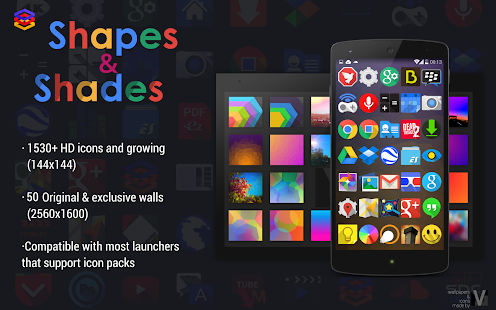
Icons based on JFK project, with more shapes and more shades ;D
It also has 50 XHD original wallpapers
• 1530 (and growing) HD icons of 144×144 (recommended for xxhdpi)
• 50 Original and exclusive wallpapers in XHD (2560×1600) made by me™
• Muzei support with built-in settings (ser data/WiFi & update time)
• tested launchers:
– nova
– apex
– action
– holo
– Kcin (kitkat)
– SSlauncher
– TSF launcher
– UnIcon
Hope you like it!
NOTES:
•REQS option was possible thanks to Tung91 & Alim Haque
•Muzei support thanks to Alex Besler
• I suggest to “supersize” icons to 115% on nova and 120% apex
• Lucid Launcher was reported to not work properly, so please, use one of “recommended” launchers.
• Internet permission its needed because of the “reqs” activity. (just wanna point out as some users asked ;D)
•New permissions (WAKE_LOCK, ACCESS_NETWORK_STATE, WRITE_EXTERNAL_STORAGE) are because muzei support. ;D
• NOTE; Please if you make a req, be sure that you send unthemmed icons, as I have to test every activity to see if its working or not. You can see all icons that are being made tru options> view all.
tags #Shapes&Shades #S&S #mlv
Power Toggles 5.5
5/11/2014 12:24:04 PM
Current Version: 5.5
Requires Android: Varies with device
Category: Tools
v5.5 update:
Version 5.5
Improved tablet support
Added immersive mode toggle for Kitkat (keyboard and other input methods will not work)
Added themes support. If you have a theme you want to be included in the app, share it on the g+ page or on the forum.
Some bug fixes
Overview:
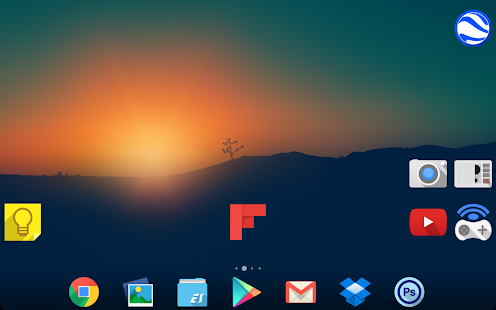
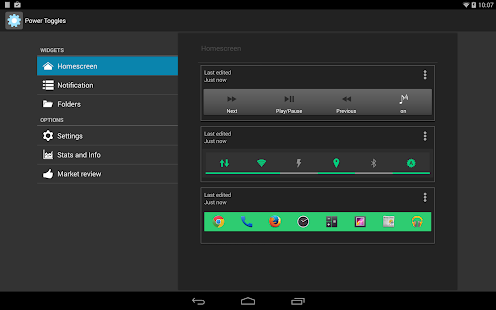
An advanced power control widget. FREE and No ads
For creating a Tasker toggle, refer http://powertoggles.com/tasker.html
For concerns regarding SuperUser permission: http://m.powertoggles.com/help.php?e=26 , https://plus.google.com/103583939320326217147/posts/T9xnMJEnzf1
FAQ: http://powertoggles.com/help/
(****** Note: Do not install on SD card ******)
**Call phone permission is required for adding direct call shortcuts on the widget.
Contains 40+ toggles including
Wifi
Mobile Data (3G/4G)
Bluetooth (toggle, discovery and tether),
Flashlight
Custom application shortcut
Custom system shortcuts
And many more…
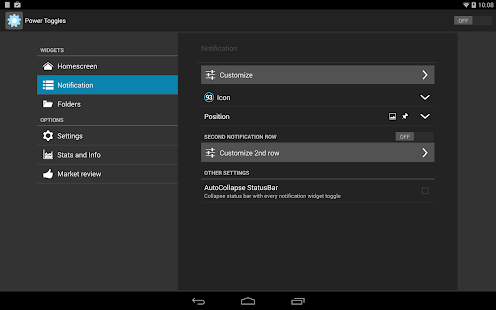
Supports homescreen widgets and notification widget. Also supports expandable notification widget on Jelly Beans and above.
Lockscreen widgets on android 4.2+
Many customization options like changing color theme and icons for individual toggles.
Backup and share widget settings from the widget configure screen (Menu > Import / Export) as well as various themes for multi-icon toggles and battery toggle.
Permissions:
android.permission.ACCESS_SUPERUSER: Required for running root commands. No effect on non-rooted phones. Users will still get the prompt asking for permission when running root command. http://m.powertoggles.com/help.php?e=26
android.permission.CAMERA: Required for the flashlight to work.
android.permission.SYSTEM_ALERT_WINDOW: required to display a toggle choice popup when using notification widget (Only on gingerbread)
Note: on gingerbread, direct notification toggle is not possible. The clicking the notification widget, it displays a popup to choose an action.
Feel free to suggest more toggle button ideas.
Please go through the Help and FAQ section in the app (fully searchable) twice before reporting a bug, most likely it is already answered there.
It is difficult for me to reply to each email individually, some of the emails may get lost in the huge list of unread mails. If you do not get a reply within a week, ping me again.
Per-App Modes 2.0.3
5/11/2014 12:23:56 PM
Current Version: 2.0.3
Requires Android: 4.0.3 and up
Category: Tools
v2.0.3 update:
v2.0.3
1 – Colored the Action Bar for better app branding and UX consistency
2 – New Action Bar icon for less UX clutter
3 – Polished the app launcher icon
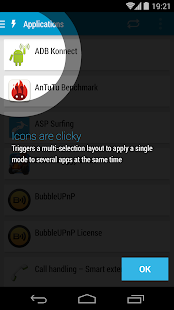
4 – Added Multi-selection to set modes on apps. Simply tap the apps icon
5 – Changed the overflow menu icon for the rounded dots
6 – Made the persistent notification with less priority which means the icon won't be visible on the Action Bar but only when you pull it down
7 – Bug fixes and smaller improvements
8 – My cat fixed a bug for me
Overview:
Android Authority – March 11, 2014:
“The bottom line is this: every hardcore root user in the entire Android ecosystem waited years to have an app like this. The ability to control your device's hardware to do something specific on every application is a tweaker's dream come true.”
With the critically acclaimed Per-App Modes you can create special profiles for each of your applications, you can create a mode with a lower maximum CPU frequency to use when you're reading a book, or while playing a game that is less hardware demandable. The possibilities are limitless.
The tunables are not available from the “Create” list? Don't worry, you can search through Kernel tunables on the built-in File Manager and add them to the list.
There are endless combinations to improve your user experience while using your applications with a beautiful and functional UI.
What are you waiting for?
Important notices:
1 – Requires Root to function. No refunds are offered if you fail to read this notice;
2 – Works on all rooted devices from 4.0.3 (Ice Cream Sandwich) up to the later
3 – Works regardless of the Kernel, so if you're using Stock or any other Kernel it will work
4 – I hold no responsibility for the misuse of this application on your device
FlatDroid (GO APEX NOVA THEME) 4.1.2
5/11/2014 11:48:20 AM
Current Version: 4.1.2
Requires Android: 2.2 and up
Category: Personalization
v4.1.2 update:
News :
+ 330 new icons
+ 2 wallpapers
+ restyling some apps design
+ fix missed app
+ bug fix
Overview:
Welcome to the new FlatDroid app.
Flatdroid it's an icon pack ispired by Google's style that will give your device a unique twist!
It cointains more than 1718 icons, 25 wallpapers, custom skins and a special COLORFUL section!
COMPATIBLE with the best launchers like:
*NOVA LAUNCHER*
*AVIATE*
*APEX LAUNCHER*
*GO LAUNCHER*
*HOLO LAUNCHER*
*SMART LAUNCHER*
*ADW LAUNCHER*
*NEXT LAUNCHER*
and many more…
If your launcher isn't present inside the application, you can still install the icon pack manually!
Manual install:
Action Launcher:
Settings > Display > Icon pack > FlatDroid
ADW Launcher:
ADW Settings > Themes > FlatDroid > Apply
Apex Launcher:
Apex settings > Theme settings > FlatDroid > Apply
Nova Launcher:
Nova Settings > Look and feel > Icon Theme > FlatDroid
Smart Launcher:
Menu > Preferences > Theme > FlatDroid > Set
**With Smart Launcher you can also set the lock screen icons:
(1) Menu > Preferences > Theme (click on the settings icon) > Bubbles: icon theme > FlatDroid
(2) Menu > Preferences > Theme (click on the settings icon) > Bubbles: style > None
Go Launcher EX:
Themes > Launcher > Installed > FlatDroid > Apply
Next Launcher:
Themes > Launcher > Installed > FlatDroid > Apply
Holo Launcher / Holo launcher hd:
Appearance Settings > Icon pack > FlatDroid
Solo launcher:
Solo settings > Appearance > Solo Themes > Themes > Installed > FlatDroid > Apply
Reviews:
http://www.tuttoandroid.net/news/flatdroid-tema-apex-nova-launcher-144353/
http://iconesfondiandroid.altervista.org/flatdroid-un-tema-made-italy/
For news, doubt or request:
EMAIL: dev.fraom@gmail.com
COMMUNITY: http://bit.ly/devFraom_community
PLUS DEV PAGE: http://bit.ly/DevFraom
You are receiving this email because you subscribed to this feed at feedmyinbox.com
If you no longer wish to receive these emails, you can unsubscribe from this feed, or manage all your subscriptions


No comments:
Post a Comment