 | Name anything in the world, and we'll show you hundreds of products that celebrate it. Or, you can design your own. From our sponsors  |
| APKTOP |
| Free Android Apps,Games Download From Android Market |
iLauncher 3.2.3-2
5/11/2014 4:50:21 PM
Current Version: 3.2.3-2
Requires Android: 2.2 and up
Category: Tools
v3.2.3-2 update:
- Fixed a crash on icon change.
- Fixed crashes of app management.
- Some optimizations.
- Fixed some crashes.
- Decreased the chance of icons to be double bordered.
- Readded an icon for Dropbox.
- Changed the icon of LINE.
- Now it just simply fades when transitional animation option is off.
- Now it does not count unread social or promotion mails from Gmail.
Overview:
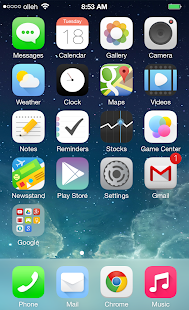
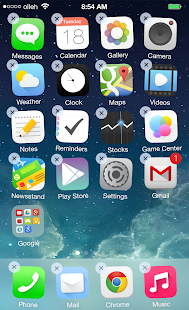
This is the iLauncher.
Power Toggles 5.5.1
5/11/2014 4:50:05 PM
Current Version: 5.5.1
Requires Android: Varies with device
Category: Tools
v5.5.1 update:
Version 5.5.1
Fixed widget backup errors when using ustion images for toggles.
Version 5.5
Improved tablet support
Added immersive mode toggle for Kitkat (keyboard and other input methods will not work)
Added themes support. If you have a theme you want to be included in the app, share it on the g+ page or on the forum.
Some bug fixes
Overview:
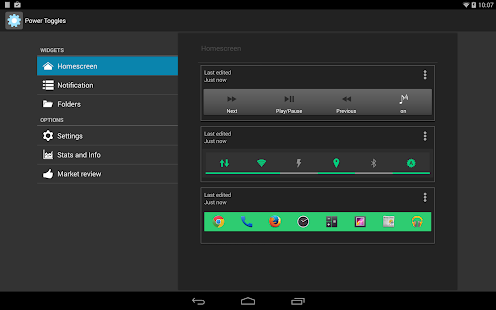
An advanced power control widget. FREE and No ads
For creating a Tasker toggle, refer http://powertoggles.com/tasker.html
For concerns regarding SuperUser permission: http://m.powertoggles.com/help.php?e=26 , https://plus.google.com/103583939320326217147/posts/T9xnMJEnzf1
FAQ: http://powertoggles.com/help/
(****** Note: Do not install on SD card ******)
**Call phone permission is required for adding direct call shortcuts on the widget.
Contains 40+ toggles including
Wifi
Mobile Data (3G/4G)
Bluetooth (toggle, discovery and tether),
Flashlight
Custom application shortcut
Custom system shortcuts
And many more…
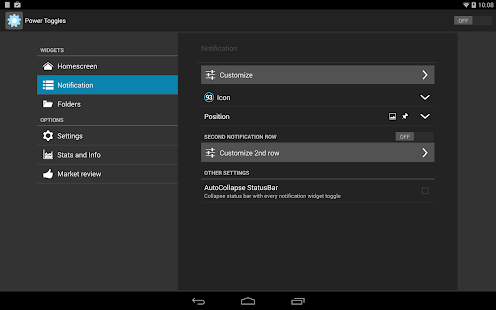
Supports homescreen widgets and notification widget. Also supports expandable notification widget on Jelly Beans and above.
Lockscreen widgets on android 4.2+
Many customization options like changing color theme and icons for individual toggles.
Backup and share widget settings from the widget configure screen (Menu > Import / Export) as well as various themes for multi-icon toggles and battery toggle.
Permissions:
android.permission.ACCESS_SUPERUSER: Required for running root commands. No effect on non-rooted phones. Users will still get the prompt asking for permission when running root command. http://m.powertoggles.com/help.php?e=26
android.permission.CAMERA: Required for the flashlight to work.
android.permission.SYSTEM_ALERT_WINDOW: required to display a toggle choice popup when using notification widget (Only on gingerbread)
Note: on gingerbread, direct notification toggle is not possible. The clicking the notification widget, it displays a popup to choose an action.
Feel free to suggest more toggle button ideas.
Please go through the Help and FAQ section in the app (fully searchable) twice before reporting a bug, most likely it is already answered there.
It is difficult for me to reply to each email individually, some of the emails may get lost in the huge list of unread mails. If you do not get a reply within a week, ping me again.
Greenify 2.3 (build 9)
5/11/2014 4:14:29 PM
Current Version: 2.3 (build 9)
Requires Android: Varies with device
Category: Tools
v2.3 (build 9) update:
Experimental feature “Keep Notifications” now works without Xposed.
New tasker plugin to wake up hibernatized app, resuming its background services and tasks.
Added a workaround for talking issue on some Samsung devices. (enable it in Accessibility settings of Greenify)
Automated manual hibernation is improved for various devices & ROMs (HTC, MIUI, and etc.)
[Donation Package]
GCM push can be blocked for specific app by disabling its notification in “Settings – Apps”.
Overview:
NEW: Non-root working mode is now supported in 2.0+, but still in early stage. It currently lacks auto-hibernation due to privilege restriction. Try “Hibernate All” shortcut (widget) for convenience. On Android 4.1+, an accessibility service can be activated to automate this manual procedure, thus eliminate all the clicks.
Greenify NEVER EVER collects your personal data despite the capability of accessibility service, it just takes advantage of it to automate things.
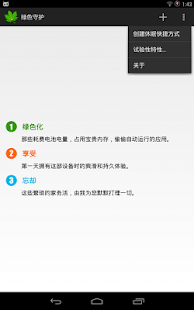
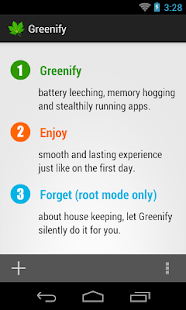
Never should your phone or tablet become slower and battery hungrier after lots of apps installed. With Greenify, your device can run almost as smoothly and lastingly as it did the first day you had it!
Featured as Lifehacker's Top 1 Utility in 2013 Best Android Apps (http://goo.gl/1VMwnE), Android Authority's Top 3 Best Root Apps (http://goo.gl/g0L0qZ).
Greenify help you identify and put the misbehaving apps into hibernation when you are not using them, to stop them from lagging your device and leeching the battery, in an unique way! They can do nothing without explicit launch by you or other apps, while still preserving full functionality when running in foreground, similar to iOS apps!
Please report bugs in the XDA forum (http://goo.gl/urHEa) or G+ community (http://goo.gl/MoszF).
IMPORTANT: Greenifying an app implies that you are aware that all the background functionality (service, periodic task, event receiver, alarm, widget update, push message) of this app will become out of service during the hibernation except when you are using this app.
NEVER greenify alarm clock apps, instant messaging apps unless you don't rely on them. Please do verify the impact of greenified apps on which you heavily rely.
Compared to other popular tools aimed for the similar purpose, Greenify offers the following advantages:
◆ Unlike the “Freeze” feature in “TitaniumBackup Pro” that totally disable the app, you can still use your app as usual, share content with it. No need to freeze & defrozen it.
◆ Unlike “Autostarts”, you can benefit from almost all of its advantages, without needing to deal with the complexity and risk of obscure app components, and never lose functionality when app is actively running.
◆ Unlike any “XXX Task Killer”, your device will never fall into the cat-mouse-game of stealthy-running and aggressive killing, which unnecessarily consumes more battery juice.
Note: Greenify do need a background persistent “Cleaner” service to put the greenified apps back into hibernation when you are not actively using them. It is designed and implemented in extremely lightweight, with an average RAM footprint at 3M in total, and nearly zero CPU and battery consumption.
In case you cannot install from Play Store: http://oasisfeng.com/Greenify.apk
=== PERMISSIONS ===
INTERNET: Needed by “Raise Your Voice” program to send back only small amount of anonymous statistics data, without privacy information. You can opt-out at any time.
DRAW OVER OTHER APP: To show guide layer over the app setting UI of system in non-root mode.
READ SENSITIVE LOG: To analysis the wake up cause of greenified apps.
GET ACCOUNTS & WRITE SYNC SETTINGS: Control the account sync of apps if its sync task is too frequent.
=== FAQ ===
* Why not support Android 2.x?
* It seems that automatic hibernation is not working.
* Some of my greenified apps (e.g. Google Maps) seems not hibernating.
* I want to greenify system apps!
* De-greenified apps still got no push notification!
……
Read here: http://goo.gl/1F5pY
=== Beta Channel ===
See G+ community board: http://goo.gl/MoszF
=== Translation ===
All translations are open for improvement: http://goo.gl/zCCDce
=== Donation ===
If you love Greenify, please consider the “donation version” http://goo.gl/fpz5l for extra experimental features:
* Greenify system apps
* Allow GCM push for hibernated apps
* Detect “who” woke the hibernated apps
ClockSync 1.2.4
5/11/2014 3:49:48 PM
Current Version: 1.2.4
Requires Android: 1.5 and up
Category: Tools
v1.2.4 update:
- History and Stats dialog now also shows the exact date/time of last synchronization attempt
- average drift calculation will not count synchronizations performed in less than 20 minutes interval for better accuracy
- improved average drift calculation algorithm, it's recommended that you reset the stats to get the best results
- added more diagnostics for problems with setting time (failed chmod and setCurrentTimeMillis() are recognized and reported)
And much more! See changes inside the app.
Overview:
☆ ROOT is REQUIRED for automatic synchronization ☆
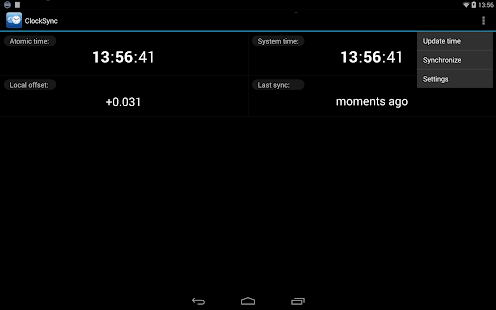
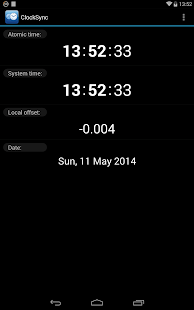
ClockSync synchronizes device system clock with atomic time from Internet via NTP (Network Time Protocol).
Useful if provider doesn't support NITZ, sends incorrect time or if your device/ROM has heavy clock drift.
There are 2 modes: automatic for root users and assisted manual mode for users without root (rootless mode).
Rootless mode features:
- automatic atomic time retrieval with configurable interval
- notification when offset exceeds user set threshold
- assisted manual synchronization with the hint what time/date to set
- precision between 1 and 30 seconds (because Android doesn't allow to set seconds)
- 1 second precision if your device resets seconds on Set (most Samsung and some HTC devices)
- Greenwich Time Signal assisted sync if device resets seconds
Root mode features:
- automatic sync with configurable interval
- accuracy is ~1-20ms depending on your connection and NTP server
- statistics (average drift per day, total time corrected)
Root is required because of Android security restrictions, vote for http://bit.ly/set_time_without_root if you want it to work without root, however Google has declined to fix it with the following comment:
“Hi, it is by design that applications can not change the time. There are many subtle aspects of security that can rely on the current time, such as certificate expiration, license management, etc. We do not want to allow third party applications to globally disrupt the system in this way.” © some Google employee
Other features:
- customizable NTP/SNTP server and timeout
- displays current date or time since last sync
- NTP server details dialog
- 3 color schemes (dark, light, default)
- 12-hour or 24-hour clock format
- time zone detection and adjustment based on geo location
- system time zone override with custom offset
- time zone management based on latest Olson tz database (zoneinfo)
- optional haptic feedback and sync notification
- clean and easy to use interface (tap screen values or use menu)
Don't have root? See http://bit.ly/phoneroot for the detailed instructions.
Don't want or can't root your device? You can still use ClockSync as your precise time source to adjust your watch or other clocks, or to verify how accurate your cell time is, or set time manually in rootless mode.
Move to SD is disabled because automatic synchronization (timers) will not work when app is moved, also app size is very small and since not all files are moved to SD in any case, it would not save you more than 50Kb.
If you get wrong time after synchronization, your phone time zone data is out of date, use http://bit.ly/tzupdate to fix it.
Issues, questions or suggestions? Please e-mail me, developers have no way to respond to Market comments.
I reply to every e-mail within one day maximum (usually instantly).
See http://bit.ly/clocksync for more information.
Google+ page: http://bit.ly/clocksync-plus
Permissions explained for paranoid users:
- RECEIVE_BOOT_COMPLETED: used only for “Sync on boot” option
- VIBRATE: optional haptic feedback on tap and sync
- INTERNET: to get time from NTP servers, to get time zone from web services
- WAKE_LOCK: to perform background synchronization without being killed in the middle by the OS
- ACCESS_NETWORK_STATE: to sync only when network is available
- ACCESS_FINE_LOCATION: to get best location for time zone from location feature when GPS is on
- ACCESS_COARSE_LOCATION: if GPS is off, network location is used
- SET_TIME_ZONE: to automatically set time zone depending on location or for manual override
- SYSTEM_ALERT_WINDOW: new permission since 1.1.5, used for transparent overlay in rootless mode to show countdown updated every second
You are receiving this email because you subscribed to this feed at feedmyinbox.com
If you no longer wish to receive these emails, you can unsubscribe from this feed, or manage all your subscriptions


No comments:
Post a Comment