 | Sign up for the club and get 12 hard-to-fiind microbrewed bottles of beer delivered each month. Makes a great gift, too! From our sponsors  |
| APKTOP |
| Free Android Apps,Games Download From Android Market |
Moon+ Reader Pro 2.5.3
5/24/2014 5:38:04 AM
Current Version: 2.5.3
Requires Android: 2.2 and up
Category: Books & Reference
v2.5.3 update:
v2.5.3
#Update Pdf engine, support outer font resources, optimize text selection
#Update French language package, thanks Fabrice Asfaux
#Improve book cover compatiblity for epub
#Optimize “Swipe to turn page”
#Fix a rarely duplicated line issue
Overview:
Better designed book reader with powerful controls & full functions, supports epub, pdf, mobi, chm, cbr, cbz, umd, fb2, txt, html, rar, zip or OPDS formats.
☀Additional benefits in pro version:
✔ Ad-free, faster & smoother
✔ Shake the phone to speak (Text-to-speech, TTS engine support)
✔ PDF support, fast & speech compatible
✔ Reading statistics function
✔ More beautiful themes, background images and fonts
✔ Customize reader bar function
✔ Headset & Bluetooth keys control
✔ Multi-point touch support
✔ Option for password protection at startup
✔ Book to home screen shortcut
✔ Annotations, highlights & bookmarks share support
✔ Open/Backup/Sync/Download/Upload book files via Dropbox/GDrive
✔ Tilt to turn page with customized actions
✔ Customer email support
☀PDF features in Pro version:
✔ Fill out PDF Form
✔ Highlight, annotation, handwriting
✔ Smart scroll lock, smooth reading experience
✔ Night mode support, 6 additional pdf themes available
✔ Dual-page mode for landscape screen
✔ Speech, auto-scroll compatible
✔ Read statistics, sync, flip animation available
☆The key features:
• Support online ebook libraries and personal calibre ebook server.
• Read local books with smooth scroll and tons of innovation.
☆Standard functions:
• Full visual options: line space, font scale, bold, italic, shadow, alpha colors, fading edge etc.
• 10+ themes embedded, includes Day & Night mode switcher.
• Various types of paging: touch screen, volume keys or even camera, search or back keys.
• 24 customized operations (screen click, swipe gesture, hardware keys), apply to 15 customized events: search, bookmark, themes, navigation, font size and more.
• 5 auto-scroll modes: rolling blind mode; by pixel, by line or by page. Real-time speed control.
• Adjust the brightness by sliding your finger along the left edge of the screen, gesture commands supported.
• Intelligent paragraph; indent paragraph; trim unwanted blank spaces and lines options.
• Keep your eyes health options for long-time reading.
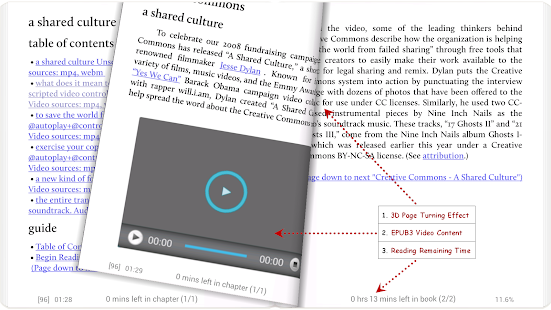
• Real page turning effect with customized speed/color/transparent; 5 page flip animations.
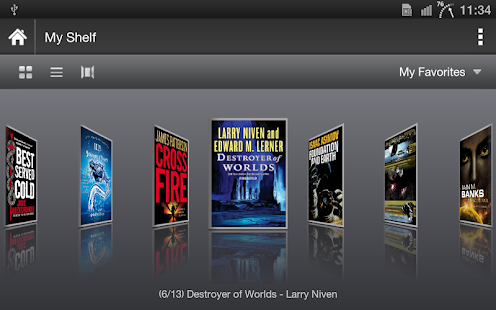
• My Bookshelf design: Favorites, Downloads, Authors, Tags; self bookcover, search, import supported.
• Justified text alignment, hyphenation mode supported.
• Dual page mode for landscape screen.
• Support all four screen orientations.
• EPUB3 multimedia content support (video and audio), popup footnote support
• Backup/Restore options to cloud via DropBox, sync reading positions between phones and tablets.
• Highlight, Annotation, Dictionary (Offline or Online, support ColorDict, GoldenDict, Fora, ABBYY Lingvo, etc.), Translation, Share functions all in moon+ ebook reader.
• Localized in 40 languages: English, አማርኛ, العربية, հայերեն, Български, català, český, dansk, Nederlands, eesti, suomi, français, galego, საქართველოს, Deutsch, ελληνικά, עברית, magyar, Indonesia, italiano, 日本語, 한국어, македонски, persan, polski, português, português brasil, român, русский, српски, 简体中文, slovenských, slovenskega, español, Svenskt, 繁體中文, ภาษาไทย, Türk, yкраїнський, Việt
-Tags: book reader, ebook reader, pdf reader, ebook speech, pdf annotate form, epub, mobi, pdf, rar, moon reader pro, ibook, stanza, kindle, nook color, aldiko HD, kobo, comics, comic reader, cbz reader
-About GET_ACCOUNTS permission: used for Google Drive function only
-About READ_PHONE_STATE permission: used to stop TTS when there is a call coming
Smart IR Remote – AnyMote 1.8.4
5/24/2014 5:37:33 AM
Current Version: 1.8.4
Requires Android: 4.0.3 and up
Category: Tools
v1.8.4 update:
- improved remote adding process
- bugfixes and small performance and ui improvements
Overview:
The only Smart Remote you'll need!
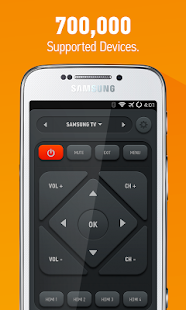
Smart IR Remote is the only IR universal remote app for Android that you'll ever need: it's smart, with a device coverage that is huge (700000 devices, with more added daily and on request), and it's the only one that makes use of features only your phone/tablet have, that a plastic remote (like the Logitech Harmony) never will. As IR remote controls go, especially android remote controls, you'll never find one better!
Not compatible with LG/Sony phones
Smart Remote works with any Samsung and HTC devices with an IR Blaster, and any other brand phone/tablet with an IR Blaster that runs Android 4.4 or above provided originally by the manufacturer, including the Galaxy S5 and the new HTC One M8. Even better, Smart IR Remote also works on most custom ROMs like CyanogenMod.
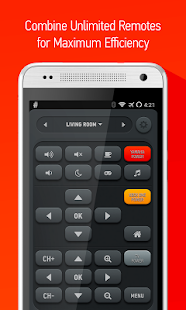
Smart IR Remote is an universal smart remote control app that can command almost anything that receives InfraRed commands, like a TV, Set Top Box (cable and satellite box), DVD, BluRay player, VCR, Amplifier, Air Conditioner, AV Receiver, DSLR camera, etc. Better yet, you can combine your remotes into smart remotes (activities) so that on your custom remote you'll have the volume buttons to your surround system, the channel buttons to control your set top box and the display buttons to control your TV. It's the only Android universal tv remote that can do that, while controlling any other device too!
Do you want to help translate our app? Visit https://crowdin.net/project/smart-ir-remote
If your remote is missing, please email us and we'll do our best to help!
On top of all that, since you're holding a phone, why not use some of it's unique features?
AIR GESTURES – exclusive to Android 4.1-4.4 Galaxy S4
Simply wave your hand above your phone to change channels, volume, or whatever your heart pleases – it's all configurable!
MUTE/PAUSE ON PHONE CALL
Smart Remote can now mute your TV, pause your media player, or even switch them off if you wish, all of that when your phone rings.
MACROS
Group commands in batches, sort them and add delays, and then execute the series of commands one after the other. Imagine being able to turn your TV, Xbox and surround system on, switch TV to HDMI 1 all with a single tap!
AUTOMATED TASKS
Automatically execute commands or macros, when certain conditions occur: your phone rings, at a time chosen by you, when you use your phone's Volume Buttons. Are you a Tasker fan? We have a Tasker plugin that integrates well and lets you to send commands
WIDGETS
With both lockscreen and homescreen widgets, you'll have your favorite just a tap away when you grab your phone. Need something even better? read on
FLOATING REMOTE (CHATHEAD)
The floating remote is a remote that stays above other apps which can be shown with just a single tap and lets you send commands even while you're playing a game on your phone
BACKUP / RESTORE
If you switch ROMs often or need the remotes you put hard work on to be available on all your devices, you can simply make a backup once and then restore on all your other devices
RECORD REMOTES – exclusive to the HTC One due to hardware limitations in other devices
Couldn't find your remote in our list? Simply record each button to have it just the way you want it. Opt in to share your remote so that other customers can make use of your work too!
Almost all brands in the world are supported, including Samsung, Sony, Toshiba, Panasonic, Yamaha, DirecTV (Direct TV), etc.
Permissions required:
- Network communication – for downloading remotes from our servers
- Phone calls (read phone status and identity) – for ID your phone for backups + task execution when your phone rings
- Draw over other apps – floating remote (chathead)
- List Accounts – login with Google for backups
- Prevent phone from sleeping – for keeping phone on while using the app
- Wifi (multicast) State – finding devices in your network
Easy Uninstaller Pro – Clean 2.2.8
5/24/2014 5:36:50 AM
Current Version: 2.2.8
Requires Android: Varies with device
Category: Productivity
v2.2.8 update:
-v2.2.1
#Uninstall history
#Uninstall reminder
#Change language
-v2.1.1
#Fix batch uninstall bug
-v2.0.7
#Hide vendor system apps for sony xperia z
Overview:
Easy & fastest uninstall tool.
#Feature
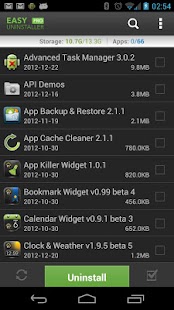
*Batch uninstall
*Fast uninstall by one click
*Show app name,version,update time,size
*Search app by name
*Various sort mode
*App share
*Search in Google Market
*Support all android system
*AD free
***************************
INFOLIFE, Make Life Easier!
***************************
#Description
Easy Uninstaller is a tool to uninstall apps for android phones. It is quite easy to use, you can select multiple apps that you want to uninstall, and click “Uninstall Selected Apps” button to uninstall them.
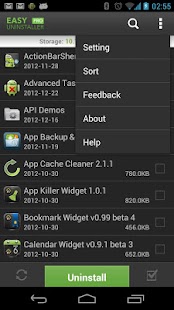
Easy Uninstaller also supports app search & sort. Type keyword in the textbox on the top to search the app that you want to uninstall. Click “Menu”->”Sort” to sort the apps in many sort types.
Long press specified app, a context menu will pop up and provide more options. You can view app details by clicking “Application Details”. You can share apps by clicking “Share”, and you can search the app in the Google market by clicking “Search in Google Market”.
Easy Uninstaller cannot uninstall pre-loaded apps in the system because it is limited by the system mechanism.
Any problem, it is better to send feedback to us to get help than low rate!
#FAQ
Q: Why can't it list pre-loaded apps?
A: Pre-loaded apps cannot be uninstalled, only if your phone is rooted, you can search “root uninstall” in Google market.
Q: Why are some apps not on the list?
A: Try to click “Menu”->”Refresh” to clean the cache and re-load the app list.
Q: Why can't I close the app?
A: The notification bar icon is used for quick start of the app. If you don't want the notification bar icon shown after you exit the app, you can just disable it in the settings. Click “Menu”->”Setting”, uncheck the “Notification Bar Icon” checkbox.
To help us translate this app to your native language, please sign up here: http://crowdin.net/project/easy-uninstaller, thank you very much!
Hi-Q MP3 Voice Recorder (Full) 1.17.3
5/24/2014 5:36:38 AM
Current Version: 1.17.3
Requires Android: 2.2 and up
Category: Music & Audio
v1.17.3 update:
1.18.6
Bug fix for Android 2.3 and below.
1.18.5
– Store recordings in the SD Card!
– Continue existing recordings
– Record in stereo
– Enjoy better UI proportions on tablets
More details about the changes: http://goo.gl/dNFDXb
Overview:
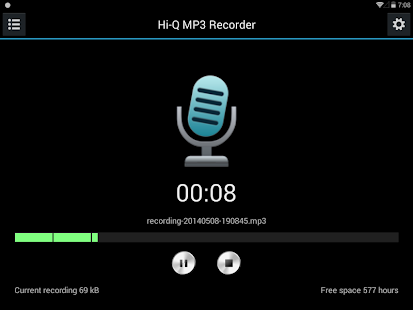
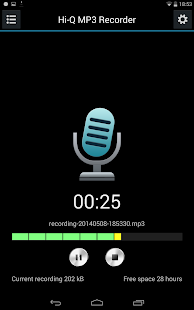
Turn your phone into a high-end voice recording device with the Hi-Q MP3 Voice Recorder. Feature-packed and loaded with customization options, the Hi-Q MP3 Voice Recorder app gives you full control over mobile sound recording.
Don't let a pre-installed app hold your phone's recording capabilities back! With high-fidelity 44 kHz audio sampling, you'll take your phone's microphone to the next level and get the best possible sound quality.
Personal voice notes, group discussions, band practice, concerts, lectures, talks, sermons and so much more—if you can hear it, the app can record it. With one-tap access and a sleek, intuitive interface, you'll be up and recording with pushbutton ease—wherever you want, whenever you want. And best of all, sharing is a breeze—you can send clips to your computer by Bluetooth, USB cable or SD card, and share via Skype, WhatsApp, SoundCloud or store online with Dropbox, Evernote or Google Drive.
– Capture audio and store as MP3 clips in real-time
– Start, pause and resume recording in a flash with home screen widget
– Customize audio quality with changeable bit rate up to 320 kbps
– Select front or back microphone for better clarity
– Switch recording icon for discretion
– Manage recordings easily—share, sort, rename and delete as you please
– Specify storage space—app automatically stops recording when storage limit is reached
– Specify input gain settings for optimum recording in various noise levels
– Share and transfer recordings in a snap—new Wi-Fi support makes transfers easier than ever
With the Hi-Q MP3 Voice Recorder you won't ever have to fuss with your phone to get the best recording quality. Record yourself and practice for a presentation, record song ideas and brainstorming sessions, record anything!
Notes
– The app does not record phone conversations.
– Recording quality may depend on the individual device. You can try out the free version first if you are unsure whether your device supports high-quality recordings.
– Widgets are enabled only when the app is installed on the phone's main storage, not external storage such as an SD card. To use widgets, go to Android Settings → Apps and move the app to the phone.
– You'll need to have Internet access when launching the app for the first time for the Google Play license check. No personal data is transmitted.
– If for any reason you're not satisfied, send us an email and we will issue a full refund.
You are receiving this email because you subscribed to this feed at feedmyinbox.com
If you no longer wish to receive these emails, you can unsubscribe from this feed, or manage all your subscriptions


No comments:
Post a Comment