 | Learn How to Engage App Users & Drive More Revenue From our sponsors  |
| APKTOP |
| Free Android Apps,Games Download From Android Market |
SD Maid – System Cleaning Tool 3.0.3.3
5/25/2014 5:39:07 AM
Current Version: 3.0.3.3
Requires Android: Varies with device
Category: Tools
v3.0.3.3 update:
Major update, SD Maid v3 
Smarter, faster, more thorough, more features & a new UI
Please don't forget to rate SD Maid!
Changelog
http://goo.gl/8FxEYJ
New permissions:
#android.permission.INTERNET
In short: Crashreports, update checking, statistics, in-app reporting
Please read: http://sdmaid.thedarken.eu/privacy
#android.permission.RECEIVE_BOOT_COMPLETED
New scheduler feature
Custom filters and EXCLUDES have been RESET.
Rest assured any issue will be fixed ASAP if you give me a chance.
Overview:
This is a powerful tool! Use at own risk!
Nobody is perfect and Android neither.
Apps you have already deleted, sometimes leave data behind.
The system constantly creates logs, crash reports and debug files you don't really need.
Your SD-card is collecting files and directories you don't recognize.
Lets not go on here…
Why not get a maid to clean it all up?
SD Maid will help you keep your device neat, clean and tidy
Give it a try, you won't find a more thorough cleaning tool!
Choose a tab, press start and then either click a single item to delete or press the clean all button. It's just that easy.
There are various features available:
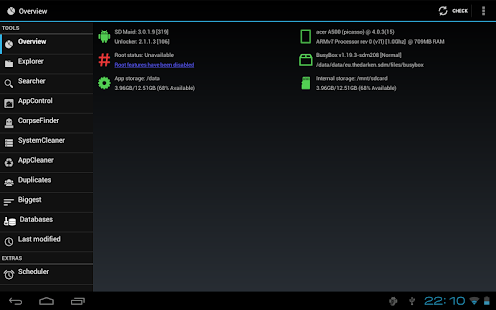
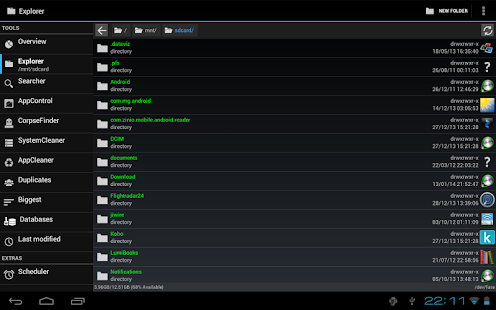
* Explorer is a full fledged filemanager, use it to crawl through your Androids files.
* You can use the Searcher if you know what file you are looking for.
* The CorpseFinder searches your device for orphaned items and compares those to the list of installed applications.
* AppControl lets you freeze, reset and remove applications (even system apps).
* The SystemCleaner scans your device and filters directories which contain unnecessary files. You an even create your own filters!
* You can optimize and shrink bloated databases to speed up access and free space.
* View your biggest files and find out what is hogging all the space.
* Find files that have been modified in the last X minutes.
And more…
A few additional features as well as comfort and convenience functions can be unlocked by buying and installing the unlocker (SD Maid Pro).
SD Maid is constantly being developed and designed very carefully.
Due to the vast amount of Android devices SD Maid might not work perfectly on your device, in that case I would appreciate it if you give me a chance to fix it by contacting me.
If you have questions or concerns send me a mail (support@thedarken.eu). I usually respond quite quickly and will happily help you out.
Obtaining SD Maid from unofficial sources puts your device at risk.
A big thanks goes out to all the beta testers @ http://sdmaid.thedarken.eu/beta who helped me improve SD Maid v3.
I would also like to thank all the volunteers @ http://sdmaid.thedarken.eu/translation that made SD Maid accessible to non english speaking users by translating it.
Today Calendar – Pro 1.27
5/25/2014 5:38:51 AM
Current Version: 1.27
Requires Android: 4.0.3 and up
Category: Productivity
v1.27 update:
Overview:
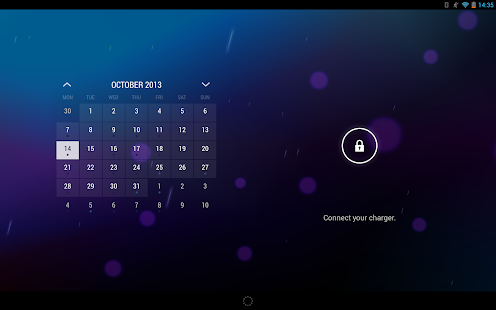
Today is a streamlined, modern calendar app for Android.
Despite being derived from the same stock android calendar as the majority of alternative calendars on the Play Store, Today sets itself apart from the competition by being the only calendar app to combine high functionality with truly beautiful aesthetics.
The stock calendar's UI was completely overhauled to create Today. The old cluttered grey-on-grey layout was replaced with a clean accented white to create a truly beautiful app.
Functionality wise, Today contains all the features you would find in the stock calendar app, with many features getting slightly modified and rebuilt from the ground up to increase performance and productivity.
The month view has been redesigned to be Today's All-In-One view. It combines both the month and agenda views of the stock calendar to allow the vast majority of users to plan and organise their days from a single view.
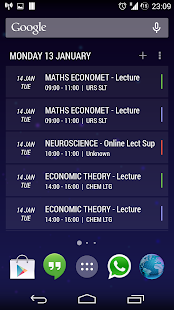
Today's widgets are the result of 6 months of improvements and optimisations – they are actually available as a separate app i released months ago. Today Calendar Widgets comes bundled with the app, providing the same beautiful, semi-transparent widgets you may already know.
Solo Launcher 1.7.1
5/25/2014 5:38:36 AM
Current Version: 1.7.1
Requires Android: 4.0 and up
Category: Personalization
v1.7.1 update:
(Add)Search Apps、Contacts、Play Music、Webpage in Solo Search
(Fix)Icons of drawer folder or drawer group would be disappeared occasionally
Overview:
Solo Launcher is the best launcher for your Android Devices! It runs at a great speed and seeks to provide users with the best and only the best user experience and interface!
BRIEF INTRODUCTION:
FREE APP!
"Yay! Finally found the best! So smooth and easy! Works and looks great! Thank you for your hard work." -Toni Snyder
“Pretty Good App Just downloaded it a day ago very smooth it comes with every thing you need and its free I just hope it stays free” – ADAM MERCIER
“Very Good! Fast, stable, cool and…….. Yes, totally free!” -Newarz Rhouban
“Excellent One of the greatest and coolest launcher I have ever used. Love it.” -jean Mondesir
It is a 5-Stars quality application!
Newly designed interface embedded with Holo Light UI
Features the New Android 4.4 KitKat Style – Simple, Light and Elegant
There are more than 300 personalized iconic settings
The launcher have more than 5000 free themes, live wallpapers, lockscreens and fonts
You can easily manage your apps and photo editors.
Faster and more user-friendly than all other Launchers
It is a fast, stable and easily customizable home launcher application that allows you to build an interactive personalised home screen experience on your Android device. Grab it now!
MAIN FEATURES:
Never miss out your emails anymore with our Unread Mail Count widget that reminds you to check your unread emails
Check daily weather forecast swiftly with our Weather widget
Better manage your daily life with our Weather Clock, Battery Saver and Task Manager widgets
Keep apps in your preferred order with our Unlimited Custom Tabs
Cool Gesture and Quick Start Actions
Compatible to themes of GO Launcher EX, Nova Launcher, ADW Launcher, Apex Launcher and Holo Launcher
HIGHLIGHTS:
1. Complete customization: more than 300 personalized settings to choose from
2. Completely FREE (other launchers may charge the features at around USD$4-5)
3. Ad-free (provides an optimal user experience with no disturbance)
4. Unread message count for SMS, emails and also miscall notifications (Nova, Holo and Apex launchers cater such functions at a fee)
5. 9 kinds of complex cool gestures: combination of single finger, double fingers, sliding, rotation, etc.
6. Organize apps into tabs and folders in the app drawer
7. Customized animated global weather clock and also an one-tap clean master to maintain the optimization of your phone
8. Faster and more user-friendly than Next, Holo, Apex, Holo and Go launchers
9. The interface is simple and clear cut; shapes out your very own personality on your Android device
10. A wide range of fabulous themes and wallpapers for you to choose from
11. Apps can be hidden to protect your privacy
12. Free widgets such as weather clock, battery saver and clean master
12. Google Services is supported perfectly on Solo launcher
Notice:
1. In the notification bar on Android 4.3 devices, it may state that 'Solo Launcher is running'. To dismiss that, just head over to Solo Settings >About > uncheck the 'Keep In Memory'.
2.We apologize for any inconvenience caused to users if Solo Launcher cannot be set as the default launcher on some rebuilt Android devices,such as Alcatel, Xiaomi due to configuration issues.
3.Solo Launcher aims to be the most customizable, safe and free application for all users. Solo requires access to some user details, if you have any privacy consideration, please take note of the details at Solo Settings > About > App Permissions.
Developer's Website:http://newborn-town.com/
Developer's Email: Solo.launcher.dev@gmail.com
Habit Browser 1.1.04
5/25/2014 5:38:05 AM
Current Version: 1.1.04
Requires Android: 4.0 and up
Category: Communication
v1.1.04 update:
v1.1.04B
Fixed multi-touch gesture set
v1.1.04
Added multi-touch gestures
Fixed Cookie save processing
Fixed Quick menu display processing
Corresponding error report
Overview:
Habit Browser is a feature-rich Web browser.
You can use easily lightly various functions.
In addition, you can make the browser your own by rich customization.
It is time to create the powerful browser of your own! !
- Translation is machine translation
Translation volunteer is welcome. please login and help to translate by
https://crowdin.net/project/habit-browser
- If you have enabled Flash, it may become inoperable by the terminal.
If you fall into inoperable, please disable or uninstall the Flash
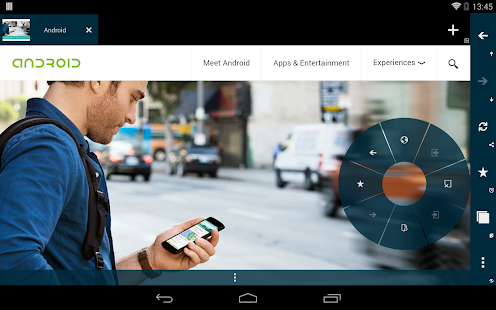
- For quick menu
Appears in the “Tap and Hold” to the Center from the side of the screen
- For user scripts
It does not correspond to the “@match” “@require”
- Permission description
ACCESS_NETWORK_STATE and ACCESS_WIFI_STATE is used in [Preload of the web page]
ACCESS_LOCATION, ACCESS_COARSE_LOCATION, ACCESS_FINE_LOCATION, ACCESS_GPS and ACCESS_ASSISTED_GPS is used in [Browser location api]
EXPAND_STATUS_BAR is used in [Open status bar menu]
INTERNET is used in [Browser]
WAKE_LOCK is used in [Stay awake settings]
WRITE_EXTERNAL_STORAGE is used in [Download and Export settings]
READ_HISTORY_BOOKMARKS is used in [Import device bookmarks]
INSTALL_SHORTCUT is used in [Add to home menu]
VIBRATE is used in [Vibration on long press settings]
NFC is used in [Android Beam]
Operation check device:
Galaxy S 4.0.4
Xperia VL 4.1.2
HTC J One 4.2.2
Galaxy S 4.3
Nexus7 2013 4.4
WallBox 1.3.3
5/25/2014 5:37:42 AM
Current Version: 1.3.3
Requires Android: 4.0 and up
Category: Personalization
v1.3.3 update:
Fixed issues with kitkat devices
Overview:
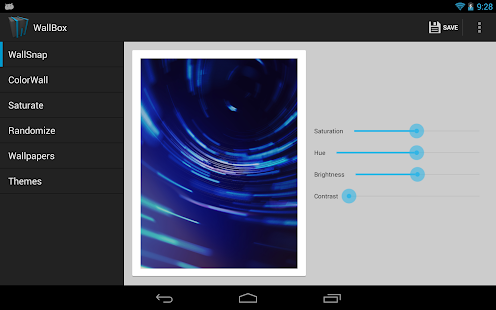
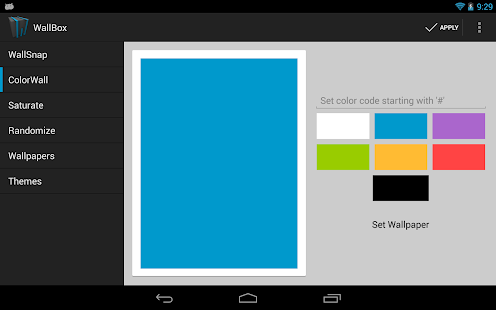
Wallpaper application that is a one stop shop for editing wallpapers!
Note: If you get a crash, please let me know. I do get some reports in the dev console, but I want this to be as clean as possible. Thanks for your help! Remember, it is still a pretty new application!
v1.3.2
Fixed null pointer in WallSnap Local
v1.3
Removed downloading wallpapers
Added WallSnap Local, which allows you to edit your wallsnaps
Removed 1 permission about on boot
Added blur to wallsnap
v1.2.1
Fixed theme selection bug
Fixed number format issues on colorwall
v1.2
Removed Sliding up panel
Removed holo color picker
Added custom simple color picker for color wall
Reordered the Drawer list items
Optimized for tablets
Theme support
Added random values in wallsnap
Merged settings into one activity
Removed about from the drawer layout
Action items are now in the actionbar
Added shadow to background layouts
Various code optimizations and bug fixes
Get more information at http://mrlithid.com
Join my Google+ community for questions or comments!
https://plus.google.com/u/0/communities/104381277142730834991
Download the source code here:
https://github.com/LithidSoftware/android_WallBox
CM App Installer 3.5.5
5/25/2014 5:37:32 AM
Current Version: 3.5.5
Requires Android: 3.0 and up
Category: Tools
v3.5.5 update:
- Added Trebuchet Launcher and cLock
- Shrank file size via. removing un-needed methods
- Other shenanigans
Overview:
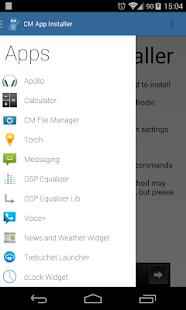
CM App Installer pushes CyanogenMod applications to any ROM, now supporting non-rooted devices!
Please try installing it the non-root method first!
I've tried a few versions of each app and tried to find a version which has the highest chance of installing normally. The ones uploaded currently are these versions!
Currently supported:
• Apollo music player
• CM Messaging
• CM Torch
• CM File Manager
• DSP Manager
• CM Calculator
• Voice +
• News and Weather Widget
** Please read this before you install! **
There are a lot of ROM's out there, some CyanogenMod-based and some not. The CyanogenMod team go much further than ROM functions, they develop apps with increased functionality over stock or older versions.
This application is designed to install these CyanogenMod apps as system apps, regardless of your ROM! You now have the choice between installing it normally, or pushing it to your system partition
The process is designed to be as simple as possible
• select your app
• press download
• press install (Root or non-root methods now available!)
• reboot (if required)
The system will refresh them upon reboot, and the app should be installed
Issues
This app isn't perfect! There isn't much I can do about these things though after looking into it, sometimes it works and sometimes it doesn't, for seemingly no reason. The most common errors are listed below
• Issue with install function copying a blank version of the application. For this reason, i've installed an “Information” button on each app, which will tell you the size of the apps where they are.. If you get an installed file size of 0, then your current ROM has this persistent issue, and there appears to be nothing I can do about it on this end. If there is, or if anyone can figure it out, please contact me. Note, this is a ROM issue, something to do with the mounting in your ROM, or the Root status of your device. This issue has nothing to do with the application itself! (if you check, the issue will persist in apps such as Root Explorer)
• Parsing errors. If checking Information under the installed app and the installed file size matches the downloaded file size, then this may be an issue with your device or ROM, and this is due to a incompatibility with the application and your device. An older version might work, but at the moment older versions of apk's aren't supported. The latest apk's are pulled from the CM nightlies every week or so. Sorry
• Voice+ showing SMS Permission error. Unfortunately this error is nothing to do with me, it is the design of the VoicePlus application and there's not a lot I can do about it. I recommend trying: Uninstalling Voice+, Use a file explorer (such as root browser) to go to your default storage directory, and there should be a folder labelled CMApps. Inside here are the downloaded apks. Try installing it from here (assuming your Unknown sources in Security is ticked)
If it doesn't work you'll have to go and grab a CM build for your phone, extract the apps and attempt to push them yourself.
**Disclaimer**
I do not take any responsibility for this app breaking the respective apps, your device, or causing spontaneous combustion. Use at your own risk, although “Uninstall (Revert backup)” should restore your previous application
I take no credit for the CyanogenMod applications, they were developed by the CyanogenMod team, and all credit goes to them for their apps. My intent is to make the install process much easier
If anyone has any suggestions as to apps that could be added, i'm available at thementalgoose@gmail.com
Donations welcome!
Bitcoin: 19G1hpBMkkB1GP7R18ELyQbSiNrDtR6AUd
PayPal: https://www.paypal.com/cgi-bin/webscr?cmd=_donations&business=thementalgoose%40gmail%2ecom&lc=GB&no_note=0¤cy_code=GBP (Available through the app)

Scientific Calculator Plus 1.6.0.39
5/25/2014 5:37:25 AM
Current Version: 1.6.0.39
Requires Android: 2.2 and up
Category: Tools
v1.6.0.39 update:
* Faster calculation. Now it is running 10 times faster in PC. In Android it is about 1.5-3 times faster depending on the handware.
* Able to process any large values, like 1000**1000;
* Result is more accurate. The rounding error of is only 5*10E-48;
* Support infinite and nan;
* Calculate eigen values and vectors;
* Support user defined input pad for both smart calc and command line. And numbers and operators can also be configed;
* Bugs fixed;
Overview:
Scientific Calculator Plus is a powerful mathematical tool to do mathematical analysis and evaluate complicated mathematical expressions similar to Matlab. More than Matlab, it has a mathematical equation(s) solver which helps user to solve mathematical problems. It supports complex number, matrix, (higher level) integration, 2D, polar and 3D chart, string, programming (using a easy-to-use language called MFP) and unit conversion. It can run in both Android phones and tablets, PC or MAC with JAVA installed. Scientific Calculator Plus for Android includes a Scientific Calculator Plus for PC and Mac. User can connect mobile device to any PC or MAC via a USB cable, copy SDcardAnMath folder to his/her own directory and launch the JMathCmd.jar in it. User can also download standalone Scientific Calculator Plus for JAVA (and for .Net) and docs at our website
https://sites.google.com/site/cyzsoft/
. Users from mainland China please visit our homepage at
http://www.baidu.com/p/cyzsoft
This calculator has provided more than 100 diffused functions covering trigonometric calculation, complex number, matrix, integration, string and chart plotting. It is also able to handle mathematical operators like plus, division, power, percent, etc. And these operators fully support matrix and complex numbers. Thus user is able to evaluate complicated expressions, which are either not supported or hard to input in most traditional calculators. Moreover, the calculator is actually based on an easy-to-use programming language called MFP. Users can develop their own functions using this tool by a PC editor, store them in mobile SD-card and use them in calculator or command line. As a programmable tool, it can do everything.
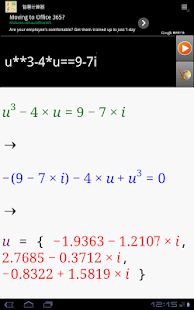
The calculator can also think for user. It is able to solve unknown variables from complicated expressions and show the result to user. To calculate result of an expression, user input an expression like 3 + log(4.1 / avg(1,5,-3)). To solve unknown variables, user input single expression like log(x) – 7== 3, or a group of expressions like
y1/3+y2==7
y2/2-y3+y1==9
y3+y1+y2==2.4
. Then simply press start button, user will see value of 3 + log(4.1 / avg(1,5,-3)) or solved x or y1, y2 and y3 value.
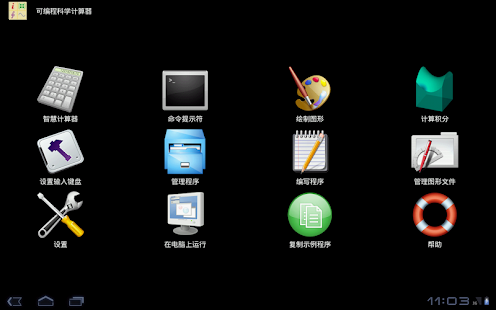
This calculator has two basic user interfaces: smart calculator interface and command line interface. In the smart calculator interface, user is able to define variables, solve equation(s) and input expression(s) from historical records, using keyboard or clicking function buttons. Function buttons are configurable so that user is able to define his/her input keypads to input user-defined functions quickly.
User can also input expressions and plot 2D, polar or 3D charts in smart calculator. The number of unknown variables and variable name determine whether 2D, polar or 3D chart is plotted. After chart is plotted, smart calculator will show chart snapshot in the output box and history record. User can review the chart by simply clicking the chart snapshot
In the command-line interface (which works like Matlab), user uses keyboard to input expressions and sees the print output (which is not shown in the calculator interface) and return value. Command-line interface is best tool for developers to output intermediate results in their functions.
In order to help user input and evaluate (higher level) integration and plot charts, this calculator includes built-in integration and chart-plotting utilities. User no longer needs to type long and complicated expressions. Instead, by simply filling the text fields and pressing buttons, user will see the results or the charts. All the charts are automatically saved in SD-card which can be viewed and managed by file manager of the calculator later on.
Like Matlab, the calculator also provides a small program editor which gives developers much convenience to build their own functions. Nevertheless, they can also user a PC editor to do this job and save the program files in SD-card for future use.
Smart Launcher Pro 2 2.5
5/25/2014 5:36:44 AM
Current Version: 2.5
Requires Android: 2.1 and up
Category: Personalization
v2.5 update:
- Now you can add/edit categories! (Pro only)
- Double tap on a bubble to show a widget (Pro only)
- Now you can protect you hidden apps with a password
- Better performance, apk size decreased to 1.8MB.
- A icon picker to pick the default SL icons.
- Double tap to turn off the screen (requires a free plugin)
- Improved backup utility.
- New optimizations for joy pad
- The standard lock screen is now available also on Smart Launcher 2
- New main icon for the Pro version.
- New translations.
Overview:
SIMPLE, LIGHT, FAST.
Smart Launcher Pro 2 is the premium version of Smart Launcher, an innovative launcher featuring minimalist design, low resource requirements and a user-friendly interface that allows you to launch any application with a few taps.
STILL MINIMAL BUT OVER FEATURED
Customizable categories
If 6 categories are not enough for you, you can now add as many categories as you want. You can have books, shopping, navigation — or you can create a new category you define yourself.
Popup Widget
You can use popup widgets to show widgets when you need them. Single tap to start an app, double tap to show a widget.
Widget screen
SL Pro 2 provides you a secondary, multiple-screen panel in which you can place widgets.
More gestures
Two-finger gestures give you even more possibilities to customize the way you start apps.
More and faster updates
SL Pro 2 is the first version to be updated and gives full access to every upcoming SL feature.
You are receiving this email because you subscribed to this feed at feedmyinbox.com
If you no longer wish to receive these emails, you can unsubscribe from this feed, or manage all your subscriptions


No comments:
Post a Comment