 | Buy or sell tickets for concerts, sports, or theater. You'll find a huge and affordable selection at Ticket Liquidator! From our sponsors  |
| APKTOP |
| Free Android Apps,Games Download From Android Market |
Splashtop 2 Remote Desktop 2.4.5.13
5/26/2014 3:20:35 PM
Current Version: 2.4.5.13
Requires Android: 2.2 and up
Category: Business
v2.4.5.13 update:
v2.4.5.13
* Bug fixes and stability improvements
v2.4.5.8
* Invite your friends to get Anywhere Access Pack for free
* Add option to connect automatically to your last-used computer
* Various usability improvements
Overview:
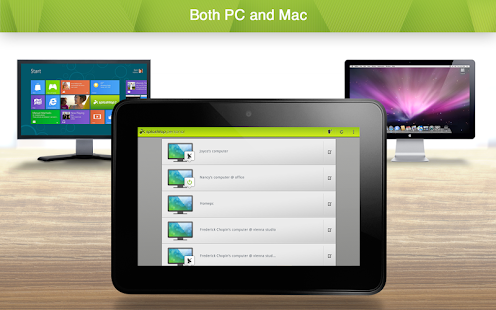
Splashtop is the easiest and fastest remote desktop app for accessing your Windows or Mac computer using your Android phone or tablet, from anywhere and at anytime!
Use Splashtop for free to access your computer on the local network with best-in-class video streaming performance. Get full access to ALL of your applications, documents, emails, full browser with Flash and Java support, and games. Also get full access to your entire media library and documents. And more!
To access your computer from across the Internet, subscribe to Anywhere Access Pack via In-App Purchase.
Over 15 million users are enjoying Splashtop today, and you should too!
====================
License:
You may access up to 5 computers via your Splashtop Account.
Splashtop Personal is for non-commercial use only, i.e. use it to access your personal computers for non-work related purposes.
For commercial use in a professional environment, please use Splashtop Business which is designed for the workplace offering enhanced manageability, security, and compliance (www.splashtop.com/business).
====================
WITH SPLASHTOP PERSONAL, YOU CAN:
* Use your Android device to access all of the programs and files on your computer with 100% compatibility, including all PC/Mac applications
* Use your full desktop browser with Flash and Java support, with all of your bookmarks and your favorite plug-ins
* Enjoy the full video and music libraries that are playable only on your computer, whatever formats they're in
* Play all the 3D games and all the Flash games
====================
Optional In-App Subscriptions:
Get Anywhere Access Pack to access your computer from across the Internet, via our global network of secure, high-performance servers:
- Access reliably across Internet over 3G/4G , from behind firewalls, etc.
- Optimized streaming performance under varying network conditions over Wi-Fi and 3G
- Fully secured via SSL with 256-bit AES encryption
- Subscribe monthly for $1.99 or annually for $16.99
Get Productivity Pack, which includes Configurable Shortcuts & Gamepad and Whiteboard:
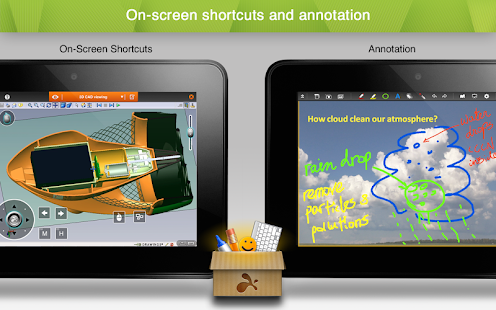
- Control your Windows and Mac apps and games easily with on-screen shortcuts mapped to your most commonly used functions. Use the built-in profiles for popular apps or create your own.
- Annotate over any live remote desktop screen. Great for presentations and classroom instruction.
- Subscribe monthly for $1.99 or annually for $16.99
See our Terms of Service and Privacy policy at http://www.splashtop.com/terms/splashtop.
====================
REQUIREMENTS:
* Windows 8, 7, Vista, and XP, Mac OS X 10.6+ or Linux (Ubuntu 12.04).
* A computer with dual-core CPU is strongly recommended for best performance.
* Internet connection is needed to use this app.
KEYWORDS: Remote Desktop, RDP, RDS, VNC, RemoteApp, Terminal Service, VPN
Boat Browser for Android 7.6
5/26/2014 3:18:46 PM
Current Version: 7.6
Requires Android: 2.1 and up
Category: Communication
v7.6 update:
V7.6 update:
1. New feature: Translate webpage or selected text into your language with Google Translate.
2. Support Google/Bing/Yahoo search engine for Canada.
3. Fix search suggestion bug of Naver.
4. Other bugs fix.
Overview:
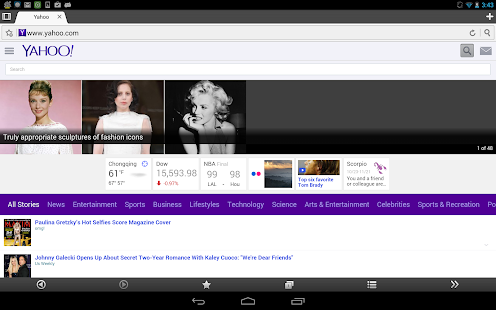
Boat Browser is a fast, smart and cool Mobile Browser; that brings an amazing Premium web experience. It is fully customizable, and you can easily change the button's locations as you choose and you can install your favorite add-ons to make your browser even more powerful!
What's special?
1. More Customizable
We have optimized the default features listed in the (Side) Toolbar. And you can customize the features as you like: re-arrange, add and remove buttons, just by dragging the corresponding icon.
In addition to the toolbar customization, you can also personalize the background color and the action of the Volume Keys. You can set the Volume Key's action to switch tabs, scroll up/down the page or zoom into the page.
2. Personalized Themes
Bored with the default theme? Can't be satisfied just changing the theme's color? No Problem! Boat Browser's got you covered!
Boat Browser's team will supply you more and more cool themes and styles, to make your browser completely personalized!
3. Add-ons
An Add-on is the unlimited expansion of your browser. Customize your browser by installing Boat Add-on's that will enhance your browsing experience. These features can be easily found in the Side Toolbar, after installation.
We will continue to develop a variety of popular and fashionable add-ons. Keep your browser up to date!
4. Powerful Bookmarks Management
Bookmarks Manager supports new folder, drag and drop, batch delete, import, export and Sync with stock browser bookmarks!
Cloud center supports backup and restore bookmarks and speed dials with Google Drive between devices with the same Google account. Also Firefox bookmark sync is supported (Pro feature).
5. Side Toolbar
You can reach the toolbar by swiping the right side of the screen. And, if you don't like it, just change the settings in setting menu. We hope it will bring you a new quicker, smarter browsing experience from now on!
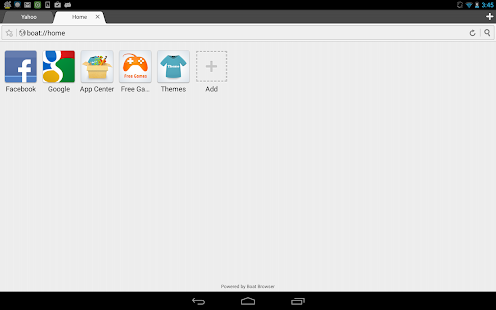
6. Speed dial
Add your favorite websites into the speed dial menu and keep them handy 
7. Floating tab
This feature supports multi-windows as PC does. You may float multiple tabs on any app.
Boat Browser also supplies some very useful features like,
- Video & Flash Video & YouTube Video Support… (In Android 4.4 plus flash doesn't work on some devices)
- Voice Command and Voice Search…
- Support App to SD function…
- Support Cache to SD function…
- Easy file Downloading
- User Agent Switching that allows you to view websites/web pages, in many formats!
- Multi-touch Pinch to Zoom support
- Super easy copy/paste
The add-ons can be easily found by searching the key worlds below, in Google Play:
1. Boat FB Add-on
2. Boat Password Manager Add-on
3. Boat URL Shortener Add-on
4. Boat Web2PDF Add-on
5. Boat Tab History Add-on
6. Boat Show IP Add-on
7. Boat Evernote Web Clipper Add-on
Also, there are some features which need purchase license key to unlock, including:
1. Floating tab feature which will float on any app.
2. Removes the banner Ads in the bookmark page and the interstitial Ads when exit browser.
3. Supports the ability to delete ALL speed dial icons, including the preset icons.
4. Supports folders for speed dial icons.
5. Firefox bookmark sync support.
6. Support up to 32 tabs.
Please download license key apk file from Google play
https://play.google.com/store/apps/details?id=com.boatbrowser.license.key
About Ads:
In this free version, users may see two kinds of Ads:
1. Banner ads in some pages, such as bookmark page.
2. Interstitial ads when users exit the browser.
This is a Browser for you! If you have any problems with it, please let us know. We are committed to providing you with the best Browser available!
Our Email: boatbrowser@gmail.com
Find out more about us via:
Twitter – http://twitter.com/BoatBrowser
Facebook – http://www.facebook.com/boatmobile
Website – http://www.boatmob.com/
Google plus – http://goo.gl/um2r08
You are receiving this email because you subscribed to this feed at feedmyinbox.com
If you no longer wish to receive these emails, you can unsubscribe from this feed, or manage all your subscriptions


No comments:
Post a Comment