 | Learn How to Measure Success & Engagement For Your Mobile App From our sponsors  |
| APKTOP |
| Free Android Apps,Games Download From Android Market |
Agent – do not disturb & more 1.3.8
5/27/2014 2:53:36 AM
Current Version: 1.3.8
Requires Android: 4.0 and up
Category: Tools
v1.3.8 update:
Improvements:
- ability to prevent battery agent kicking in when at home or work (via wifi connections)
- drive agent refinement: fewer false starts!
- drive agent won't read out messages during calls
- "Urgent" alerts use nicer volumes now
- removed starting sound from Sleep Agent
- silencing music properly when messages are read out when driving
- various battery usage improvements
Overview:
Agent is a must have app for any Android user and gives you these essential missing features for your smartphone: AUTOMATIC battery saving, drive, meeting, and sleep modes!
★Featured as one of TechCrunch's best apps of 2013! http://techcrunch.com/2013/12/31/the-best-ios-and-android-apps-of-2013/★
★Watch us on CBS' Good Day Show as App of the Week! http://gooddaysacramento.cbslocal.com/video/9727659-app-of-the-week/★
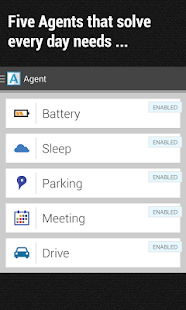
Agent automatically saves your battery, silences your phone during meetings, remembers where you've parked, auto-responds when you're driving and allows only urgent calls and messages through when you're sleeping.
What users are saying:
“Before finding this app, I had 3 other apps that each did only part of what this app does altogether!”
“This is perfect. It's simple, elegant and works perfectly without fail. Great job.”
“Awesome functionality! I highly recommend! This app is so cool. You've got to get it and see for yourself. It handles the things that are normally hassles so you don't have to fuss with it. It just works and puts your phone to work for you!”
“When I get in the car, it handles my texts and reads incoming ones aloud. When I'm in bed asleep, it knows to screen my calls. I love this app!”
“Agent is different. It worked perfectly first time, with almost no setup. This is a must have app for me.”
Find us on twitter: https://twitter.com/agentfeedback
★ Drive Agent is triggered by bluetooth and motion sensing (activity detection). It can be configured to read SMS messages aloud, respond with voice, auto respond to texters and callers to let them know you're driving (editable message) & only respond to your own hand-picked list
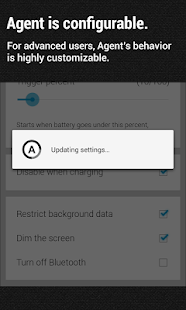
★ Battery Agent triggers at a percentage you choose. It helps conserve battery by giving you the option to turn off bluetooth, dim your screen and reverts back to normal settings automatically when you charge your phone. Will also let you know how much battery it saved you.
★ Parking Agent remembers where you parked, based off your speed or bluetooth connection. Will remember your last five parking spots
★Meeting Agent syncs with your calendar to silence/ put your phone on vibrate when you don't want to be disturbed. It can be configured to activate for busy events only, gives you the ability to specify your working week so that it only syncs with your calendar on days and times you prefer, works with shared calendars and auto responds to selected contacts during these “busy” events.
★ Sleep Agent will silence your phone automatically when you go to sleep. You can configure sleep times for different days of the week, minutes of inactivity before activating, auto response to selected callers and texters during your sleeping hours, list of contacts that can wake you & Bluetooth, autosync, wifi and mobile data deactivation.
App Permissions Explanation:
-NEW Reroute outgoing calls: For our new status sharing feature which will be released in the next few weeks. we won't actually re-route calls but users have the option to have a notification pop up if you call another agent user and they are in a meeting or sleeping (ie one of the agent states are active). You will both have the option to opt into this status sharing feature.
- Send SMS: We use this when auto-responding to texts whilst you are driving (if selected), or when you are sleeping for emergencies.
- Read SMS: When driving Agent will read out your text messages to you to prevent distraction. We don't know the contents of any messages.
- Read Contacts: This is so that the app can determine whether a contact is in your address book or not (an option for who is allowed to contact you when busy)
- Precise Location: Parking Agent requires this to store your parking location.
Finally, build customized Agents with our free Trigger app! Available for download on Google Play Store: https://play.google.com/store/apps/details?id=com.jwsoft.nfcactionlauncher&hl=en
Handy Note Pro 7.1.4
5/27/2014 2:53:22 AM
Current Version: 7.1.4
Requires Android: 2.2 and up
Category: Productivity
v7.1.4 update:
71.4 release notes
Sort by date, sort your notes on newest and oldest.
7.1.3 release notes
1. Eliminate 2013 planner from basic template
2. New add-ones: ResPack 17 Free Diary 2
7.1.2 release notes
1.Change cover for private Notes.
2.2014 Planner in Add-Ons
7.1.1 release notes
Folder in Folder
7.1 release notes
1. New drawer menu and widget
2. Add-Ones ( free and paid)
3. shortcut to backup and sync
4. New user guide and FAQ in facebook
7.0.4 bug fix
Overview:
★No.1 of top 100 Free app in Amazon app store of America, German,France, Italy ★
★ AndroidAuthority: Almost like a real notebook ★ Gizmodo: One of the 10 Best S Pen Apps for the GALAXY Note II. ★ Applatter: An app for all your note-taking needs! ★ XDA: Awesome Note taking app
Say good-bye to bringing large and bulky bags with Handy Note. It's a personal, professional, and school notebook all at the same time, it almost like a real notebook.
Private Notes
You can create password-protected journals. This way, you'll be able to prevent other people from sneaking into your private notes. Highly recommend this feature to anyone who likes to write diaries and personal memos.
Magic Pen
What's great about paper notebooks is that you can write things using your own handwriting style. It makes you feel more connected to the things that you write. The same goes for Handy Note. It provides its own handwriting tool which is great for stylus pen users.
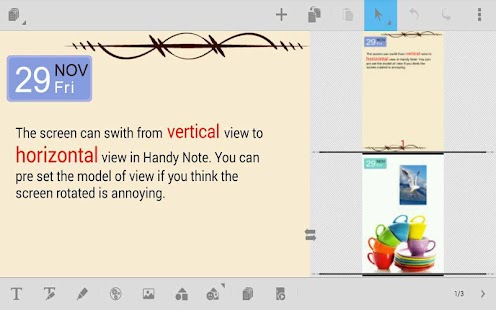
Freedom of input and layout
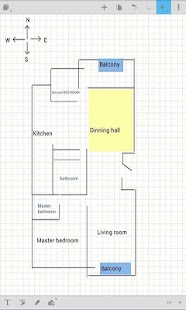
put all following elements on the same page: text, handwriting, free drawing, photo, video, symbol, shape, SMS, contact, date/time, apps, and more. change element's size, color, background, and put them anywhere on pages freely.
Customizable Templates
Unlike other note-taking apps, Handy Note features a lot of customization options. You are also free to choose from its wide range of build in templates. There are templates for diaries, business, academics, etc. You can even create a personal notebook planner. Plus, you can create unlimited pages.
Quick View and Preview Widget:
Are you too lazy to flip the pages? Well, you don't really have to. With this app, you can simply take a quick glance of your notes via Quick View. You can also browser notebooks page by page on your Android desktop without open Handy Note.
★★Features★★
★Magic Pen: No matter you are using finger or stylus, double panel writing allows you to write without stopping and feel like writing on a paper.
★Editable handwriting: handle your handwriting just like editing text: copy & delete word by word, bulletin & numbering, alignment, and mix with text.
★Notelet: Insert combinations of contents / functions into a page just like put widget on your desktop. Items such as Date, Time, SMS, contacts, link, video, webview . Notelet can make your notebook a personal hub.
★Random access with Evernote in enex form.
★ Add -on for Handy Note Pro: 9 App Package and 15 Resource Package.
ResPack 01- Free Notebook: personal profile, important number log, contact list
ResPack 03- Free Diary: a set of free installable diary templates
ResPack 06-Healthy Life: 30 logs & checklists for diet, meal planner, workout & exercise.(paid)
ResPack 07-Covers: 32 covers for notebooks and 8 for folders(paid)
ResPack 11 Symbols: 200 high quality, well-designed symbols & icons(paid)
ResPack 13- Family Budget:record your family income and expense in Handy Note.
ResPack 14-Vegetarian List: a grocery shopping list for vegetarian in Handy Note
AppPack 01-Photo Editor: An enhanced photo editing and effects function app
AppPack 02-PIM: Personal Information Manager
AppPack 03-Chart: bar chart ,line chart,pie chart
AppPack 04-List Set: Create check list, home budget, shopping list with calculation functions
AppPack 05-Budget:do money management better by tracking income and expense
AppPack 06-Calender:Enter your work & academic schedule in a clear, easy and convenient way
AppPack 07-Unit Converter:Universal Unit converter and Calculator
To find out more add on and please search ” AppPack” ” ResPack” ” appbody”
Real Colors Pro 1.3.5
5/27/2014 2:52:14 AM
Current Version: 1.3.5
Requires Android: Varies with device
Category: Tools
v1.3.5 update:
• Removed no longer user permissions
• Bug fixes
Overview:
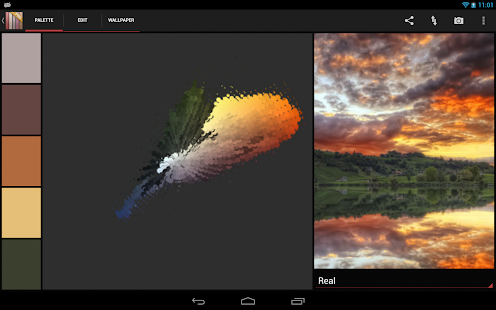
Used by 100.000+ creative people all over the world, Real Colors is the leading color palette generator from photos. We help designers and creative people get inspired from real life.
IMPORTANT: Because of historical reasons and customer support, the functionality provided by Real Colors Pro is identical to that provided by upgrading to Pro inside our other app Real Colors. So, if you would like the full functionality, you can either buy the Real Colors Pro app OR use the upgrade inside the Real Colors app.
Google Play Staff Pick for both mobile and tablet.
“A designer's must”, Miguel Maria Colon del Rey, Product Designer, Barcelona
“Fantastic work”, Gina Chacon, Digital Artist, Mexico
“Love it”, Adam Bjurstrom, Freelance designer, Louisville
Features:
- Automatically generate color palettes (color schemes) from photos using color theory rules: complementary, monochromatic, analogous, shades, triad, tetrad, split complementary and our unique algorithm
- Create beautiful wallpapers from your favorite color palettes
- Automatically generate the color spectrum from photo
- Colors from the color palette (color scheme) can be easily edited
- Get detailed information about the colors (HEX, RGB, HSB)
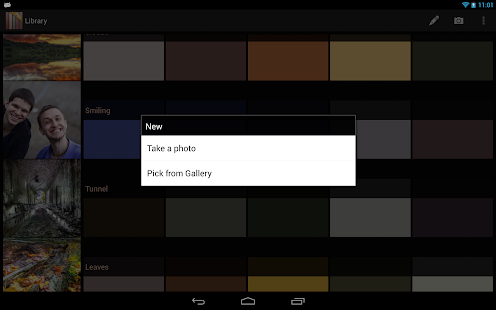
- Save color palettes in a library for future reference
- Export your color palettes (photo, color spectrum, HEX, RGB and HSB color values, Adobe Swatch Exchange file)
- Share your most beautiful color palettes (color schemes)
Real Colors is used by creatives all over the world for web design, interior design, colour matching for clothing and creating color themes.
We appreciate any kind of feedback that will make this product better. Send us your ideas to realcolors@makan-studios.com.
LayerPaint HD 1.3.10
5/27/2014 2:51:31 AM
Current Version: 1.3.10
Requires Android: 4.0 and up
Category: Tools
v1.3.10 update:
[1.3.10] “Hide TitleBar (ActionBar)” function has been added (“Settings” menu). You need to restart LayerPaint HD.
[1.3.8] “Pen Pressure Adjustment” function has been added (“Others” menu)。
[1.3.7] “Disable Single Touch (UI)” function has been added (“Settings” menu)
[1.3.5] Crash bug fixed.
[1.3.4] Small fix.
[1.3.0] Layer Folder, 1 bit Layer and 8 bit Layer has been added (Enable from settings).
Overview:
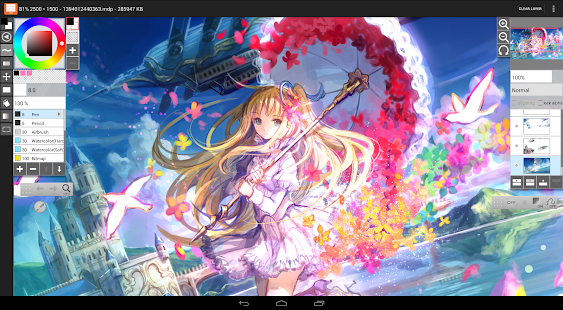
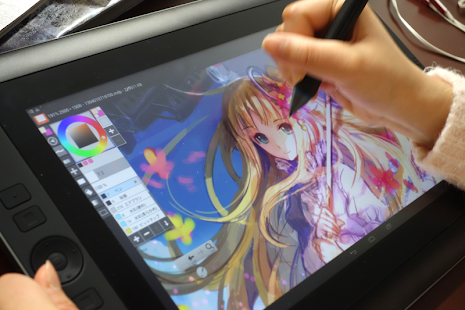
- Designed for Tablets (7 inch and over)
[Implemented]
- Pen Pressure Support (Check Settings)
- Open/Save (MDP Format / It opens by FireAlpaca)
- PSD Import/Export
- Foreground color brush, Transparent color brush
- Add Palette, Remove Palette
- Add Layer, Remove Layer, Clipping Layer, Lock Alpha
- Layer Mode (Normal, Add, Multiply, Overlay, Screen)
- Selection Tool (Rectangle, Lasso, Free Transform)
- Bucket Tool (Auto Expand (0, 1, 2 pixel), Enable/Disable AntiAliasing)
- Filter (Hue, Gaussian Blur, Mosaic, Monochrome)
- Navigator (Check Settings)
- Eraser, Move Tool, Fill Rectangle, Gradient
[Manual (machine translation)]
[Example]
http://mdiapp.sakura.ne.jp/lphd_fuzi/ (Process
http://fuzichoco.com/ (Artist – fuzichoco
[Testing Devices]
- Galaxy Note 10.1 (2012)
- Galaxy Note 10.1 (2014)
- Galaxy Note 8.0 (N5120)
- Nexus7 (2012)
- Cintiq Companion Hybrid
- HTC J ONE
- LG Optimus G (LGL21)
[Translation]
- Korean language : https://twitter.com/MyungsooLim
[Twitter]
https://twitter.com/LayerPaint/
[Report]
- https://www.youtube.com/watch?v=RAKV_Ptq8DY (layerpaint video
- http://www.tomshw.it/cont/news/video-epic-fail-come-si-disegna-con-galaxy-note-e-wacom/54629/1.html (come si disegna con Galaxy Note e Wacom
- http://tablet.wacom.co.jp/buddy/event/0928report.html (Japanese
[Update History (Old)]
[1.2.12] Small fix (PSD File)
[1.2.9] Fix for Android 4.4.
[1.2.6] Brush and UI response has been improved.
[1.2.5] Optimize for Galaxy Note 10.1 (2014 Edition).
[1.2.4] Deselect button has been added.
[1.2.0] View rotation function has been added (Navigator).
[1.1.8] Vanishing point snap has been added.
[1.1.7] Multithreading performance has been improved. Bug fixed (Navigator).
[1.1.6] Bug fixed (Brush Panel).
[1.1.5] Malfunction of Eyedropper has been fixed.
[1.1.4] New option (settings) has been added (Show brush opaque bar). Malfunction of Brush Preview has been fixed.
[1.1.3] Scatter Watercolor brush has been added. Receiving Image from other apps has been supported.
[1.1.2] Bug fixed (Watercolor brush)
[1.1.1] Modification of the translation.
[1.1.0] Filter function has been added. (Hue, Gaussian Blur, Mosaic, Monochrome)
[1.0.9] Eyedropper tool's position has been changed.
[1.0.8] Small fixes.
[1.0.7] Malfunction of Eyedropper has been fixed.
[1.0.6] Small fixes.
[1.0.5] Galaxy Note 10.1 (2014) Support. (Brush Lag Fixed)
[1.0.4] “Position toolbar always on right or left” option has been added (Settings). New UI Scale (85%) has been added (Settings).
[1.0.3] Bug fixed.
[1.0.2] Show Pixel Grid option has been added (Settings).
[1.0.1] Bug fixed.
[1.0.0] Official version.
[0.9.30] Bug fixed.
[0.9.29] Navigator function has been added (Settings).
[0.9.28] Bug fixed (Xperia Tablet Z).
[0.9.27] Korean language support. Brush property (Bitmap/Scatter).[0.9.26] Crash bug fixed
[0.9.25] Bug fixed (Brush Snap)
[0.9.24] Eraser button (Stylus) support.
[0.9.23] Multi-touch has been improved.
[0.9.22] Bug fixed.
[0.9.21] “Locate the toolbar on the right side” option has been added.
[0.9.20] “Lowering a canvas display resolution mode” has been added. “Gallery Manager (Others)” has been added (Delete File/ Rename File).
[0.9.19] “Open” has been improved (Faster).
[0.9.18] “Export/Share Transparent PNG” function has been added
[0.9.17] “Gallery (Open)” has been improved
[0.9.16] “Free Transform” function has been added
[0.9.15] Brush Property (Pen, Eraser, Airbrush, Watercolor)
[0.9.14] Transform has been improved
[0.9.10] “Flip View” function has been added (Toolbar)
[0.9.6] “Save As” has been improved
[0.9.5] Crash bug fixed
[0.9.2] Volume key Undo-Redo (Settings)
[0.9.0] First release
Javelin Browser 3.1.0
5/27/2014 2:51:24 AM
Current Version: 3.1.0
Requires Android: 4.0 and up
Category: Productivity
v3.1.0 update:
- You can now download files with Stack
- Incognito improvements
- Spirit mode improvements
- More languages, better translations
- Open 3rd party apps with links
- More bug fixes
Overview:
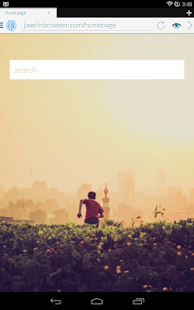
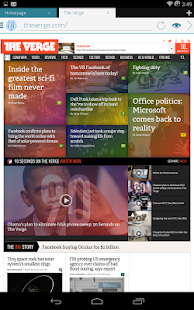
Javelin is a GORGEOUS Android browser focused on the MOBILE experience of surfing the web.
★ #1 mobile browser with BUILT-IN ADBLOCK
★ First Android browser with READING MODE (Similar to Readability/Pocket app)
★ TRUE-MULTITASKING with Javelin Stack
Just these first 3 features will be enough to sell a browser to Barack Obama. But that is just the icing on the delicious browser that Javelin is. Here are the other things Javelin is capable of:
● Quick navigation via touch gestures
● Translucent status bars and navigation bars (KitKat only)
● Intelligent bookmarks (Bookmarks are sorted based on frequency of use)
● Built-in Proxy Services (In-app subscription required)
● Incognito mode (Private browsing)
● App opens immediately (Fast start times)
● HOLO (because YOLO)
FAQ
● (Permission) Location access – Disabled by default. This is for websites that require your location (Think Google Maps, or Google Local Search). It can be enabled/disabled in settings.
● (Permission) Accounts – Used only 1 time. This is for contact purposes. Should the need arises, the developer (myself) needs to know which account to send an email to.
● (Permission) Billing – For in-app purchase, see the next point.
● (Permission) System Alert Window – For Javelin Stack
● (Permission) READ_PHONE_STATE – To close Javelin Stack when Stack Browsers are open
● (Permission) GET_TASKS – For the upcoming Javelin Stack blacklisting feature
● (In app Subscription) Including a 30 day trial, Javelin requires an in-app subscription to enable its built-in proxy service for censorship bypass.
e-CAL Calendar 1.4
5/27/2014 2:50:46 AM
Current Version: 1.4
Requires Android: 4.0.3 and up
Category: Productivity
v1.4 update:
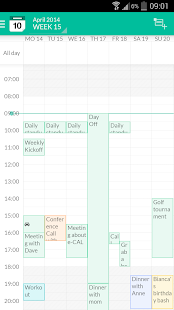
✪ Week-agenda view
✪ Improved mega-month view
✪ Improved month view
✪ Improved notificaties
✪ Improved dayscroller
✪ Bugfixes
Overview:
CLEAN CALENDAR APP & WIDGET FOR ANDROID
e-CAL Calendar is a fresh designed, clean and easy to use FREE calendar application for Android that is synchronizing with your Google, Exchange, Outlook and Facebook calendars. Designed for smartphones and tablets.
WHAT VIEW SUITS YOU BEST?
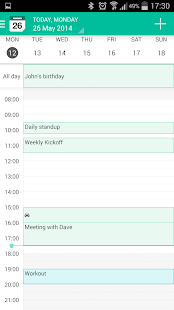
Beautiful display of your appointments and events in day, week, week-agenda, month, mega-month and list view. All available in portrait and landscape mode.
FAST AND EASY TO USE
E-CAL Calendar has a magnificent interface and intuitive usability. Designed for both light as extensive users
YOU
We listen to our users. Miss something? Need help? Please let us know at support@e-calapp.com and let's get in touch.
FEATURES
● Easy to use, feature rich smartphone and tablet calendar solution
● Beautiful display of appointments and events in day, week, month, mega-month and list view. In portrait and landscape mode
● Pretty navigation with smooth and fast transitions
● Displaying multiple calendars in one view makes managing work, projects and home calendars easy
● Use colors to make events stand out
● Drag and drop events
● No ads and completely free
● Works without setup for all calendars on your Android device (Google, Facebook, Exchange, Outlook, etc)
● Uses Android's native calendar backend and synchronisation
● Low battery drainage
● Homescreen widgets for fast calendar access
● Quickly add events on the right time using tap-and-hold
● Pinch to zoom for a perfect fit in your screen
● Link contacts to events
● Many options for recurring events
● Invite participants/ share appointments and events by e-mail
● Manage attendees and invitations
● Search function
● Notifications
SPECIAL FEATURES
● Add visible travel time to your appointments
● Add multiple attachments to your appointments, also available for non-e-CAL users
● Add local weather info to your calendar views
● Flat and clean design
● Available in English, Dutch, Spanish, Swedish, Italian, Spanish, Portuguese, German, Chinese and Russian
AVAILABLE IN THE CALENDAR STORE
● 180.000 + live-calendars (Sports, Holidays, Weather, Financial)
● Live updated (livescores) soccer calendars like Barcelona, Bayern Munchen, Real Madrid, Barcelona, Paris Saint Germain, Manchester City, Chelsea, Atletico Madrid, Juventus and many more
● Live updated Formula1, Nascar and DTM calendars
● Live updated NBA, NFL, NHL calendars
● Official holidays, school holidays and religions holidays available for every country
● Finance calendars like Nasdaq, AEX, Nikkei, Euronext
● Moonphase calendar
● Sunrise calendar / sunset calendar
● Name Days
● Week Numbers
SUPPORTED ANDROID VERSIONS
● Android OS 4.0.3 and higher
LIKE
♥ If you love eCAL Calendar, please rate or comment and recommend it to your friends.
IMPROVEMENTS
● If you have improvements, or if you find a bug please send an email to support@e-calapp.com and we'll try to fix it.
COMING UP SOON
● Personal Assistant
● Event planner option
● Smart tasks
● Configurable font sizes for the app and the widgets
● Dark theme
● Customise background, colours and settings
● Agenda view
● And much more …
You are receiving this email because you subscribed to this feed at feedmyinbox.com
If you no longer wish to receive these emails, you can unsubscribe from this feed, or manage all your subscriptions


No comments:
Post a Comment