 | Find great prices for amazing hotels wherever your next destination may be. It's simple to search 100+ sites at once! From our sponsors  |
| APKTOP |
| Free Android Apps,Games Download From Android Market |
SMS Backup & Restore Pro 7.10
6/9/2014 6:10:33 PM
Current Version: 7.10
Requires Android: 1.5 and up
Category: Tools
v7.10 update:
v7.10:
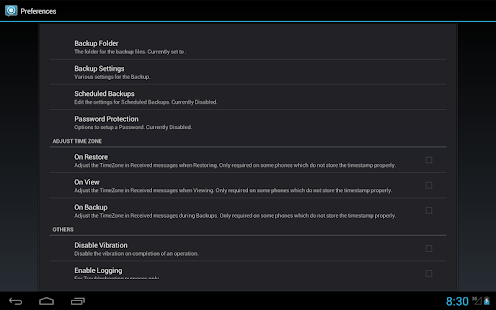
- New backup folder option for Android 4.4+ device. Backups can now be created in app-specific folder on external SD Card.
- More options displayed in Backup and Restore screens.
- Links are now clickable when viewing messages.
- Bug fixes
v7.08:
- MMS Backup bug fix.
v7.07:
- MMS Restore bug fix.
v7.06:
- More bug fixes.
v7.05:
- MMS attachments can now be viewed.
- Viewer performance improvements
- Bug fixes
Overview:
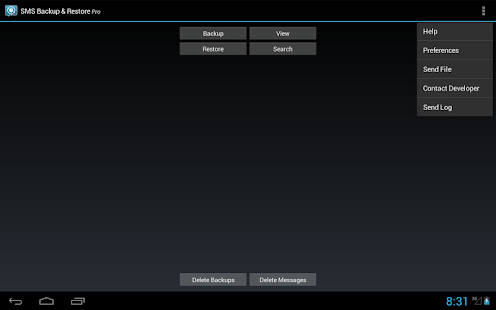
A simple App to Backup and Restore SMS Messages. This is a Paid No-Ads version of the Ad-Supported Free App.
NOTE:
The backup is created locally on the phone by default unless you configure it to upload to Email, Google Drive or Dropbox. You are responsible for backup files and the files are not sent to the developer in any case.
On Android 4.4+ devices, if you have performed the Restore and the messages don't appear in Hangouts then:
- Open Hangouts and Disable SMS from Settings.
- Exit the Hangouts app
- Open Hangouts and Enable SMS from Settings.
APP FEATURES:
- Backup SMS Messages in XML format.
- Backup created locally on the device with options to automatically upload to Email, Google Drive or DropBox using the Add-On app.
- Choose a scheduled time to automatically backup.
- Backup format is independent of the Android version so the messages can be easily moved from one phone to another, irrespective of the Android version.
- Option to select which conversations to backup.
- View/Restore all Messages or only selected conversations.
- Delete all SMS Messages on the Phone.
- Email a backup file.
- The XML can then be converted to other formats, and can also be viewed on a computer.
- Tested on Android v1.5 to v4.4.2
Please note that MMS (Picture/Audio/Video messages) support is currently in BETA.
On newer phones with inbuilt storage the default backup location will probably be the internal storage card and not the external.
This is because the phone reports the storage that way.
If you intend to do a factory reset on the phone, please make sure you save/email a copy of the backup outside the phone before doing it.
Lots more info at http://android.riteshsahu.com/apps/sms-backup-restore
FAQs can be found at http://bit.ly/d9t7Jk
Please start the app at least once after updates so that the scheduled backups start working.
This App needs access to the following:
* Your messages: Backup and Restore messages. Receive SMS permission needed to properly handle messages received while the app is the default messaging app on Android 4.4+ devices.
* Storage: To create the Backup file on the SD card.
* Phone calls – Without this the Restore fails on some phones.
* Your social information: To display and store the contact names in the Backup file.
* Run at start-up: Start scheduled Backups.
* Control Vibration: To vibrate the phone when an operation is completed.
* Prevent Phone from Sleeping: To prevent the phone from going to sleep/suspended state while a Backup or Restore operation is in progress.
* Test access to Protected Storage: To create the Backup file on the SD card.
Icons designed by Vlad Kitanoski of www.vk-solutions.com
SD card cleanup tool 2.0.5
6/9/2014 5:50:03 PM
Current Version: 2.0.5
Requires Android: 2.3.3 and up
Category: Tools
v2.0.5 update:
bug fixed
Overview:
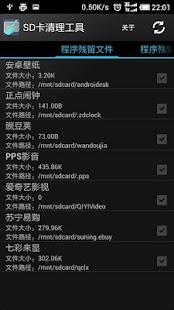
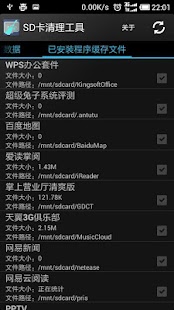
SD card cleanup tools residual files left on the SD card after a clean-up applications uninstall tool that can automatically scan and does not delete the cache files in the SD card after uninstall applications; can clean up the application has been installed in the SD card cache file.
Get ROOT access users can clean up temporary files in the system, such as system logs, crash reports, cache, logs.
miCoach train & run 2.4.2.16617
6/9/2014 5:49:29 PM
Current Version: 2.4.2.16617
Requires Android: 2.3.3 and up
Category: Health & Fitness
v2.4.2.16617 update:
NEW:
adidas miCoach supports the miCoach SPEED_CELL Bluetooth Smart as Stride Sensor for Running on selected phones (having Android 4.3 and higher).
Easily check whether your phone supports Stride Sensors by checking the settings and the availibiltiy of the SPEED_CELL option.
Get your miCoach SPEED_CELL and HRM Bluetooth Smart on adidas.com!
Please stay tuned for more exiting updates during 2014!
Overview:
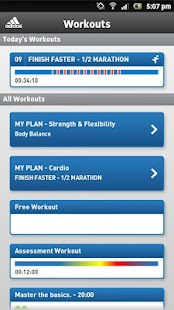
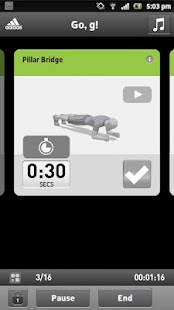
Turn your phone into a personal coach; miCoach is your smart running compagnion on Android phones. The app uses GPS and real-time voice coaching to pace you through your exercise regardless whether you are indoors or outdoors. Additionally get access to hundreds of strength & flex exercises to achieve your fitness goals. miCoach works with many adidas top athletes and coaches to offer the best in training building speed, endurance and strength. Train smarter and be faster with miCoach!
Features:
- Track your workouts: the app measures distance, pace/speed, calories burned and elapsed time.
- Analyze your data: get your run- and workout score and check your performance in animated charts (also in landscape)
- Display your route on Google Maps and calculate a detailled elevation profile
- Heart-rate: support of Bluetooth Smart HRM on selected Android phones (Android 4.3 and higher). Heart-rate can be used for premium voice coaching as well as simply for tracking.
- Stride-rate: support of miCoach SPEED_CELL Bluetooth Smart as a stride sensor for running on selected Android phones (Android 4.3 and higher). Stride-rate can be used for premium voice coaching as well as simply for tracking of stride but also the length of your workout independent from GPS.
- Premium voice coaching by selected adidas athletes and highly customizable audible alerts.
- Get daily planned workouts and coaching feedback delivered to your Android Smartphone
- Easy access to your music during your activity and deep integration with Google Play Music.
- Track your progress and reach your goals: access your latest achievements and major milestones.
- Get stronger: access to more than 400 strength & flexibility exercises and practice by instructional videos.
- Gear Section: track your shoe usage.
- Sync to miCoach.com to save and view detailed analysis of your workouts.
- Supports the analysis of workouts done by the adidas Smart Run watch (synchonized via Wifi to micoach.com from the watch to the app).
AnTuTu Benchmark 4.5
6/9/2014 5:48:47 PM
Current Version: 4.5
Requires Android: 2.3 and up
Category: Tools
v4.5 update:
v4.4.3
-Support smart TV or BOX.
-Improve the social media section.
-Add Prolish,Portuguese and Thail translate.
-Update Russian translate.
Overview:
Antutu benchmark is the most popular Android smartphone and tablet benchmarking app in the world!.
☆ Over 100,000,000 users
☆ No.1 benchmark app,used as an industry standard by most of leading technology companies and hardware review sites.
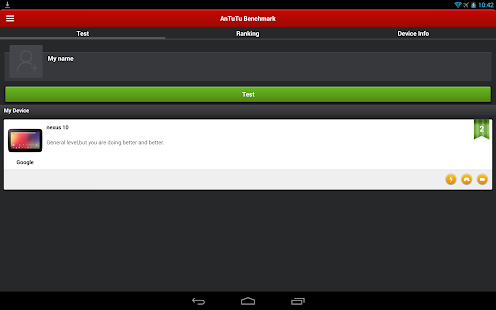
Through click and go test suite, Antutu benchmark measures User Experience, CPU, RAM, 2D/3D graphics, GPU, I/O performance of Android smartphone or tablet. You will get accurate device performance score report. The score will update to the Antutu benchmark database and get your device ranking, which you can share and compare it with other Android devices.
Benchmark Matrix:
☆ User Experience (UX) – Direct impression on smart device performance with detailed scores.
☆ CPU Tests – Measures how powerful of CPU , with detailed score points and true hard numbers.
☆ RAM Tests – Real processing ability the RAM.
☆ GPU Tests – Real graphics processing performance, 3D effects, games, and video play performance.
☆ I/O Tests –A direct score that reflects on the factual input/output (I/O) performance your system permits.
Get your device Antutu benchmark score and ranking! Compare and share it with your friends!
NOTE:
The Antutu benchmark score of your device is decided by your hardware configuration, also affected by many elements, including system mode, device temperature and running apps and other elements. It may not be the same score every time you test.
Follow us on Twitter: https://twitter.com/antutulabs
Find us on Facebook: https://www.facebook.com/antutulabs
For any suggestion or feedback, we expect your great ideas via email : support@antutu.com
or on our Google+ page
https://plus.google.com/communities/107479465868959358493
For the Ainol ,Ramos , ONDA. please download: https://play.google.com/store/apps/details?id=com.qqfriends.com.music
You are receiving this email because you subscribed to this feed at feedmyinbox.com
If you no longer wish to receive these emails, you can unsubscribe from this feed, or manage all your subscriptions


No comments:
Post a Comment