 | Start using Mint today to set a budget, track your goals and do more with your money. From our sponsors  |
| APKTOP |
| Free Android Apps,Games Download From Android Market |
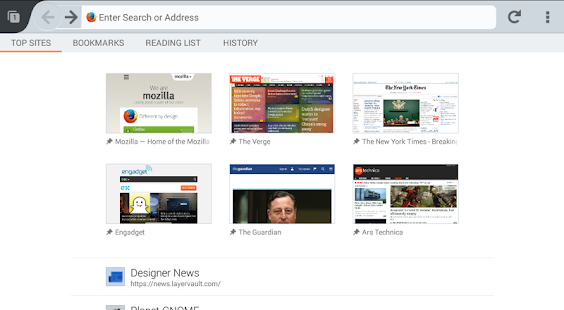
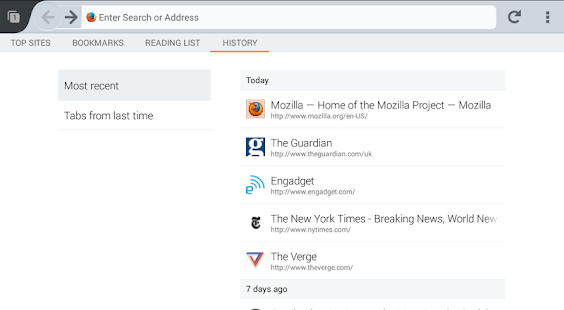
Firefox Beta 30.0
5/8/2014 12:38:31 PM
Current Version: 30.0
Requires Android: 2.2 and up
Category: Communication
v30.0 update:
NEW
Add-ons create new home page panels
Re-order panels in about:home
Quickshare buttons to Context menu
Locales: Belarusian [be], Argentine Spanish [es-AR], Mexican Spanish [es-MX], Indonesian [id], Latvian [lv], Indonesian [id], Malay [ms]
CHANGED
Disallow calling WebIDL constructors
DEVELOPER
Box-shadow and visual overflow fixes
Mute and volume per window with WebAudio
Background blend mode default
Ignore autocomplete=”off” when save passwords offered
http://mozilla.org/mobile/beta/notes
Overview:
Help refine and polish the newest features almost ready for prime time. With Firefox Beta, you get to test the latest performance, customization and security enhancements before they make it to our next version. Have an impact by helping to put the finishing touches on features and functionality.
**We need your help testing ARMv6 and Intel x86 Atom based devices! If you have an ARMv6 or Intel x86 Atom based device, download Firefox Beta and tell us what you think. **
Find a bug? Report it at http://mzl.la/android_bugs.
Want to know more about the permissions Firefox requests? http://mzl.la/Permissions
See our list of supported devices and latest minimum system requirements at https://www.mozilla.org/en-US/firefox/mobile/platforms/.
ABOUT MOZILLA
Mozilla is a proudly non-profit organization dedicated to keeping the power of the Web in people's hands. We're a global community of users, contributors and developers working to innovate on your behalf. When you use Firefox, you become a part of that community, helping us build a brighter future for the Web. Learn more at mozilla.org.
SkipLock: Skip the lock screen 1.2.5
5/8/2014 12:16:07 PM
Current Version: 1.2.5
Requires Android: 4.0 and up
Category: Tools
v1.2.5 update:
1.2.0 – This version has a bunch of new features. There are too many to list here, so see the website for the full list. http://benhirashima.com/posts/skiplock-updated-to-1-2-0/
1.2.5 – German translation
Overview:
*** This app is installed as a trial by default. The app is fully functional for 4 days, then you can convert it into the unlimited version with an in-app purchase. There is no separate version or extra download.
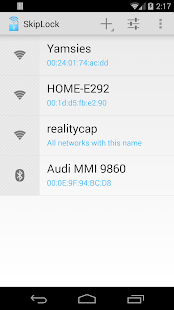
Tired of entering your password all the time? SkipLock lets you skip past the lock screen when you're connected to a designated wifi or bluetooth device. When you're at home or in your car, your phone is safe and you don't need to be typing in your password all the time. When you're connected to your wifi network, or a trusted bluetooth device, you can go straight to the home screen when you press the power button. You can even have it keep the phone unlocked while you're connected to a bluetooth keychain, headset, or car. As soon as the phone gets out of range, it locks.
SkipLock is the leading password convenience app on the market. It's focus is on reliability, quality, and a great user experience. The setup wizard makes it easy to setup, and helpful dialogs are displayed if something isn't quite right.
“SkipLock is one of the best applications we have ever tested here at Cult of Android, and we strongly believe that it should be a standard feature on every Android device. Best of all, the application itself has been coded to perfection, which makes it a pleasure to use, and most of the time you don't even realize it's there…” – Cult of Android
SkipLock is the successor to Unlock With WiFi. Major improvements have been made. Here is a full explanation of why I made it a separate app: http://benhirashima.com/posts/the-rebirth-of-unlock-with-wifi/. If you bought Unlock With WiFi within the last two months, please contact me and I will either refund your purchase or give you a free copy of SkipLock.
Some of the features in SkipLock:
- Pattern and face unlock supported on rooted devices
- Completely redesigned Android 4+ user interface
- No background service = less memory usage and more reliable
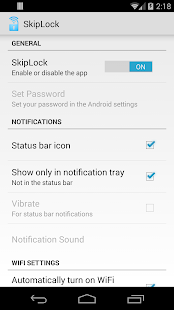
- No status bar icon required (but it's still an option). Tray-only notifications also an option.
- If you have notifications enabled, you can tap the notification to instantly lock the device
- Automatically turn on/off wifi
- Automatically turn on/off bluetooth
- Automatically turn on/off sync
- WidgetLocker integration
- Low memory usage and minimal impact on battery life
- Can save your battery if you let it automatically turn off wifi, bluetooth, and sync
Known limitations:
- Support for the Galaxy S 5 is only partial at the moment. The fingerprint scanner is not supported. Only patterns work in root mode, but PINs and passwords work in non-root mode.
- Only passwords or PINs are supported on non-rooted devices
- If your employer enforces a password policy on your phone, the app won't work. This is the case for many corporate Exchange users. If your phone is rooted, you may be able to avoid this problem.
- This app doesn't work on phones that have full device encryption enabled.
- The app doesn't unlock when connected to Bluetooth LE devices. Only regular Bluetooth devices.
- Motorola Skip or Dots may not work correctly when SkipLock is installed
- Do not install this app on the SD card. It will not be secure if you do.
- To uninstall, you must select Uninstall from the menu inside the app. The normal way won't work.
- SkipLock is not compatible with TimePin or any other app that controls the lock screen, except for WidgetLocker.
Please read the FAQ before you install this app http://benhirashima.com/skiplock/faq
Tech support is only available in English.
By downloading this software, you are agreeing to the End User License Agreement, which can be read here: http://benhirashima.com/skiplock/eula. It's pretty standard stuff.
BASE – Smart Notifications 3.3
5/8/2014 10:55:33 AM
Current Version: 3.3
Requires Android: 2.3.3 and up
Category: Personalization
v3.3 update:
Overview:
Base is an innovative tool that brings your mobile notifications to life. Instead of browsing through dozens of unnecessary notifications every day, Base delivers only what's really important exactly when you need it.
Base is always there when you need it- on a screen you never thought can be used. Every time you get an important alert, your phone's black screen comes to life, elegantly reminding you to interact with it. After a quick glance at the notification, a simple tap is all you need to dismiss the notification and launch your device directly to the relevant app.
Base will also deliver you relevant suggestions and recommendations that best fit your needs. As you evolve as a user, Base evolves with you. Base get smarter and smarter overtime, constantly striving to deliver you the most relevant and accurate information tailor made especially for you. It saves you time and trouble by filtering the massive notification bar clutter, delivering smart content alongside generic Android notifications like Gmail, missed calls, SMS, and more.
FEATURES:
———-
Minimal Design - Base features a dimmed display that is always on only when you need it. Base saves you battery life by only switching on when in your hand, and keeping the screen off when in your pocket.
Smart Suggestions - Discover what's going on around you in real time. Get traffic updates when you're leaving home, find the best pizza place in your city and stay up to date with the live score of that big game tonight. Base packs all the info you ever looked for, all in one place.
Perfect Timing - Base becomes smarter and smarter over time. It fits itself to your schedule, and learns when and how you like to get your notifications. Big meeting at work? Base will be quiet as a mouse, minimizing the notifications disruption factor.
Intuitive Experience - Tap on an incoming notification to unlock your phone directly to the relevant app. Bad timing? Swipe to dismiss the notification, and teach Base it's not a good time. Use other gestures like hover to interact with notifications and recommendations.
PRIVACY
All information gathered by Base is stored locally on your device to ensure your full privacy. Widdit will NEVER share any of your personal information with a third party agent.
App developer? Learn how you can implement the Base technology with your app, and discover a whole new way to communicate with your users at www.basesdk.com.
DiskUsage 3.4.3
5/8/2014 10:35:07 AM
Current Version: 3.4.3
Requires Android: 1.0 and up
Category: Tools
v3.4.3 update:
3.4.3: Fixed missing storage card on KitKat
3.4.2: Support for KitKat Android and extfat.
3.4.1:
- Bug fix: support large application data and don't report it as “System data”
3.4
- Fixes for Nexus 10
- Display cache for applications. Sorry for didn't spotting this earlier, missing cache was causing huge amount of space displayed as system data for some users.
- New Astro can't be launched from DiskUsage, so removed it from the list of supported file managers. Older Astro should work fine.
Overview:
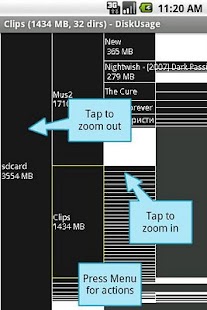
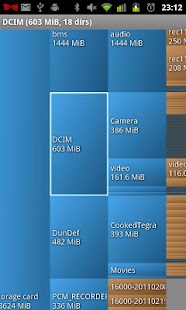
DiskUsage provides a way to find files and directories on storage card which consume a lot of space.
Displays diagram with directories/subdirectories proportional to their size.
Press MENU for actions.
Integrates with OI FileManager and Astro.
If program fails or gives you out of memory error message – please contact me. Thanks.
Source available under free license (GPL-2)
Keywords: visual space on internal storage flash sdcard memory file directory folder sd xdu xdiskusage spacemonger windirstat baobab storage space cleaner
Perfect Viewer 2.3.0.5
5/8/2014 10:35:03 AM
Current Version: 2.3.0.5
Requires Android: 2.2 and up
Category: Comics
v2.3.0.5 update:
2014/05/08 Version 2.3.0.5
-Fixed start-up crash problem
2014/05/08 Version 2.3.0.4
-Fixed can't assign long tap function problem again
-Now can remove all icon on the quick bar
-Fixed touch indicator incorrect on new touch zone style
2014/05/06 Version 2.3.0.3
-Fixed can't assign long tap function problem
-Fixed application hanging when disallow Google Drive login
Overview:
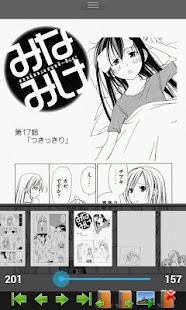
Perfect Viewer is a very fast image/comic viewer.
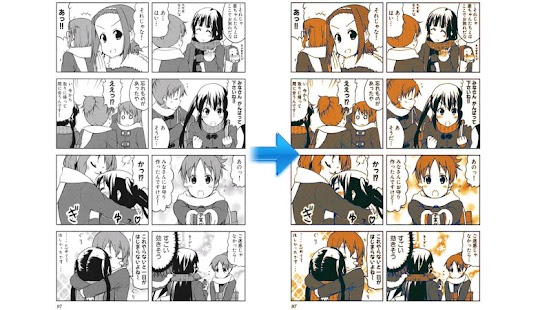
*Turn black/white image into 4 colorize image(Only available for donated users. Need install Perfect Viewer donation application).
*Page layout: Auto single page, Auto dual page, Auto switch by screen orientation
*Support Windows, Linux etc. network file sharing(CIFS/SAMBA)
*Require internet permission for CIFS/SAMBA support.
*Support image file format: JPEG,PNG,GIF,BMP,WebP
*Support archive file format: CBZ/ZIP,CBR/RAR,7Z/CB7,LZH
*Support PDF file after install the PDF plugin
*Smooth filters: Averaging, Bilinear, Bicubic, Lanczos3;
*Five view mode: Full size, Fit Screen, Fit Width, Fit Height, Fixed size, Stretch;
*Support Left-to-right & right-to-left reading
*Set image as wallpaper
*Browse image in folder/archive as thumbnail
*Bookshelf function
*Support pinch to zoom & fling gesture
*Simple bookmark function
*My favorites management
*Cache next and previous page
*Simple file management(delete, rename)
*Slideshow
*Adjust image brightness,contrast & gamma
*Auto cut off white border.
Google Drive 1.3.144.25
5/8/2014 10:14:21 AM
Current Version: 1.3.144.25
Requires Android: Varies with device
Category: Productivity
v1.3.144.25 update:
- Bug fixes and performance improvements
Overview:
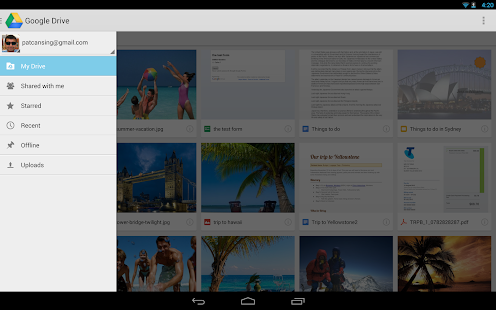
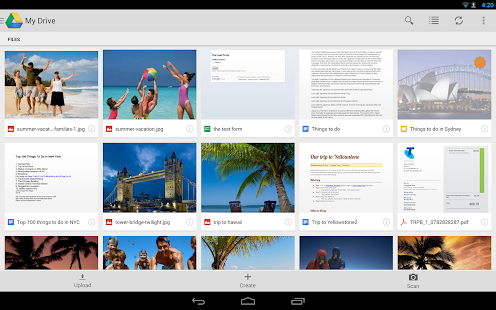
Google Drive is one safe place for all your stuff. Upload photos, videos, documents, and other files that are important to you, then access what you need wherever you go, on any device. Get going with up to 15GB of storage. Free.
- Upload files to Google Drive directly from your Android device
- Share photos and files with friends, family, and colleagues
- Access files others have shared with you on Google Drive
- Make any file available offline
- Manage files on the go
- View Google presentations with full animations and speaker notes
- View your PDFs, Office documents and more
- Scan documents, receipts and letters with your device camera then search by contents
- Print files stored in Google Drive on the go using Google Cloud Print
- Open files stored in Google Drive through Drive enabled apps in the browser
- Optimized experience to take advantage of larger screens for tablet users
You are receiving this email because you subscribed to this feed at feedmyinbox.com
If you no longer wish to receive these emails, you can unsubscribe from this feed, or manage all your subscriptions


No comments:
Post a Comment